A manual booking lets you enter a stay directly into the panel — without waiting for a guest's form. Useful when a guest called, wrote via WhatsApp or arranged the details in an offline conversation.
Where to find it
Bookings → the "+ Add booking manually" button in the top-right corner above the table.
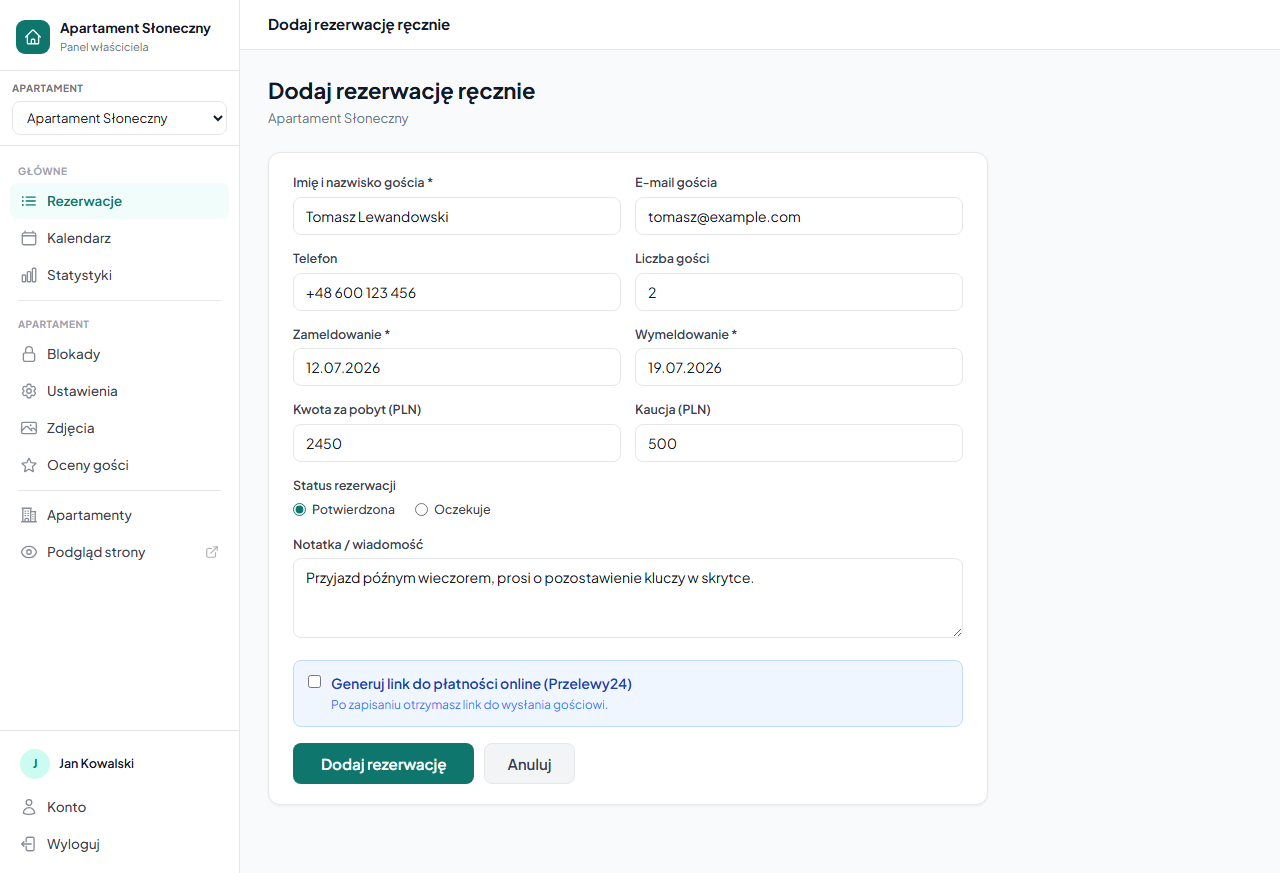
The form — what you fill in
Guest details
- Full name (required) — visible in the booking list and in emails.
- Guest email — optional, but required if you want to send the guest an online payment link.
- Phone — optional.
Stay details
- Check-in and Check-out (required) — dates in DD.MM.YYYY format. The system checks that the chosen dates don't conflict with existing bookings or blocks.
- Number of guests — 1 by default, range 1–20.
Amounts
- Stay amount (PLN) — enter the amount agreed with the guest. Entering
0means no payment tracking (a free booking or an irrelevant amount). - Deposit (PLN) — by default takes the value from the apartment settings (Settings → Pricing → Deposit). You can change it for this specific booking.
0= no deposit collected.
Booking status
Choose whether the booking should be:
- Confirmed — immediately blocks the date in the calendar and is treated as active.
- Pending — goes to the pending list, like any new request.
Note
A text field for a private note visible only to you — e.g. details of arrangements with the guest.
Online payment link
If you have the Przelewy24 gateway configured and provided the guest's email, you can tick "Generate online payment link (Przelewy24)". After saving the booking you'll be redirected to a page with the payment link, which you can copy and send to the guest.
How a manual booking works
A manual booking behaves exactly like any other:
- It blocks dates in the calendar and in iCal synchronization.
- It's visible in the booking list with a status label.
- You can edit, cancel, add notes and send messages to the guest.
- The event history records that the booking was "Added manually by the owner".
Multiple apartments
If you have several apartments, a selector appears at the top of the form — choose which apartment you're creating the booking for.
What does NOT happen automatically
With a manual booking, automatic emails to the guest (request confirmation, status change) are not sent. You can send a confirmation email manually via a message to the guest.
If you want the guest to receive a check-in instructions link — make sure the booking has the Confirmed status and that check-in instructions are configured — they'll be sent automatically on arrival day in the morning (around 9:00).
Related articles: Payments in a booking — payment history · Confirming and cancelling bookings · Editing a booking · Deposit (refundable) · Online payments — Przelewy24 configuration · Owner notes