A custom domain lets your booking page work at www.yourdomain.pl instead of your-name.erphome.pl. It's an add-on that requires an active subscription with this extension.
Requirements
- An active subscription with the Custom domain option (+PLN 10.00 net/mo — see subscription plans)
- A domain bought from any registrar (OVH, Domeny.pl, Nazwa.pl, GoDaddy, Cloudflare…)
- Access to the registrar's DNS panel
Step 1 — Check that the option is active
Go to My account → Custom domain. If you see the message "Option not available in your current plan", click "Buy custom domain →" and pay for a subscription with this option.
Step 2 — Add a DNS record at your registrar
Sign in to your registrar's DNS panel and add one of the records below:
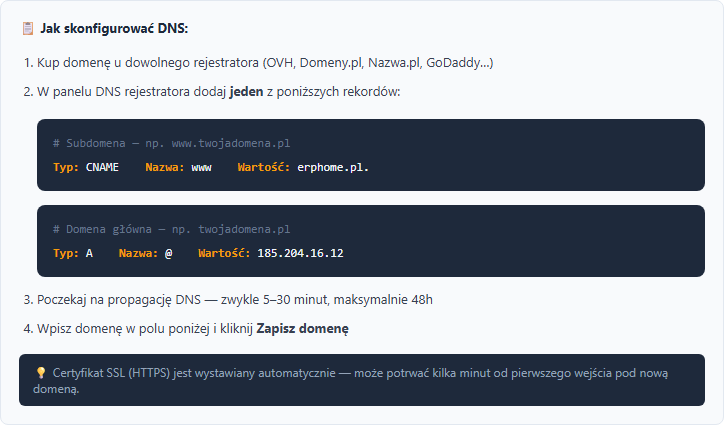
Option A — www subdomain (recommended)
For the www.yourdomain.pl address:
| Type | Name | Value | TTL |
|---|---|---|---|
| CNAME | www | erphome.pl. | 3600 |
Option B — apex domain
For the yourdomain.pl address (without www):
| Type | Name | Value | TTL |
|---|---|---|---|
| A | @ | (the IP address shown in the Custom domain section) | 3600 |
Don't add both records for the same name at once — that causes conflicts. Choose either
www(CNAME) or@(A).
Where to find this setting at popular registrars
OVH / OVHcloud: Domains → Your domain → DNS zone → Add a record
Domeny.pl: DNS management → DNS zone → Add entry
Nazwa.pl: Client panel → Domains → DNS → Edit DNS zone
Cloudflare: DNS → Records → Add record — turn off the orange cloud (set DNS only, grey cloud), otherwise SSL won't work correctly.
Step 3 — Wait for DNS propagation
DNS propagation takes from 5 minutes to 48 hours (usually 15–60 minutes). Check the status at dnschecker.org — enter your domain and verify the result matches the value from step 2.
Step 4 — Enter the domain in the erphome.pl panel
Go back to My account → Custom domain. In the Your domain field, enter the address without https://, e.g. www.yourdomain.pl. Click "Save domain".

When you save, the system automatically checks your domain's DNS records and shows the result:
- "Custom domain saved and correctly pointed to the platform (CNAME → …)" — everything is ready, the page will be available at the new address
- "Custom domain saved, but DNS doesn't point to us yet (detected: …)" — the domain was saved, but the record from step 2 isn't working yet; the message suggests the exact CNAME record to set at your registrar
The second message doesn't mean a save error — usually DNS is simply still propagating. The check repeats every time you save the domain, so once it propagates you can click "Save domain" again to confirm the correct setup.
SSL (HTTPS) — automatic certificate
The SSL (HTTPS) certificate is issued automatically by Let's Encrypt on the first visit to the new domain. This can take a few minutes. If the browser shows a certificate error — wait 5–10 minutes and refresh.
Does the old erphome.pl address still work?
Yes — the your-name.erphome.pl subdomain still works alongside the custom domain. Guests can use either address.
Removing the domain
In My account → Custom domain, click the red "Remove domain" button and confirm. The page returns to your-name.erphome.pl. You can remove the DNS record at your registrar yourself or leave it — it won't have any effect.
Related articles: How to check and share your booking page · Subscription plans · Language versions of the page · Booking widget on your website