If you already have your own website (a company site, WordPress, Wix or plain HTML), you don't have to give it up. The erphome.pl widget adds a booking box for your apartment to it: the guest picks dates and the number of guests, sees right away whether the date is free, and a button leads them to confirm the booking.
Where to get the widget code
Settings → Calendars → the "🧩 Booking widget for your website" card.
There you'll find two ready-to-copy variants: separately for each apartment (switch the apartment in the top menu if you have several).
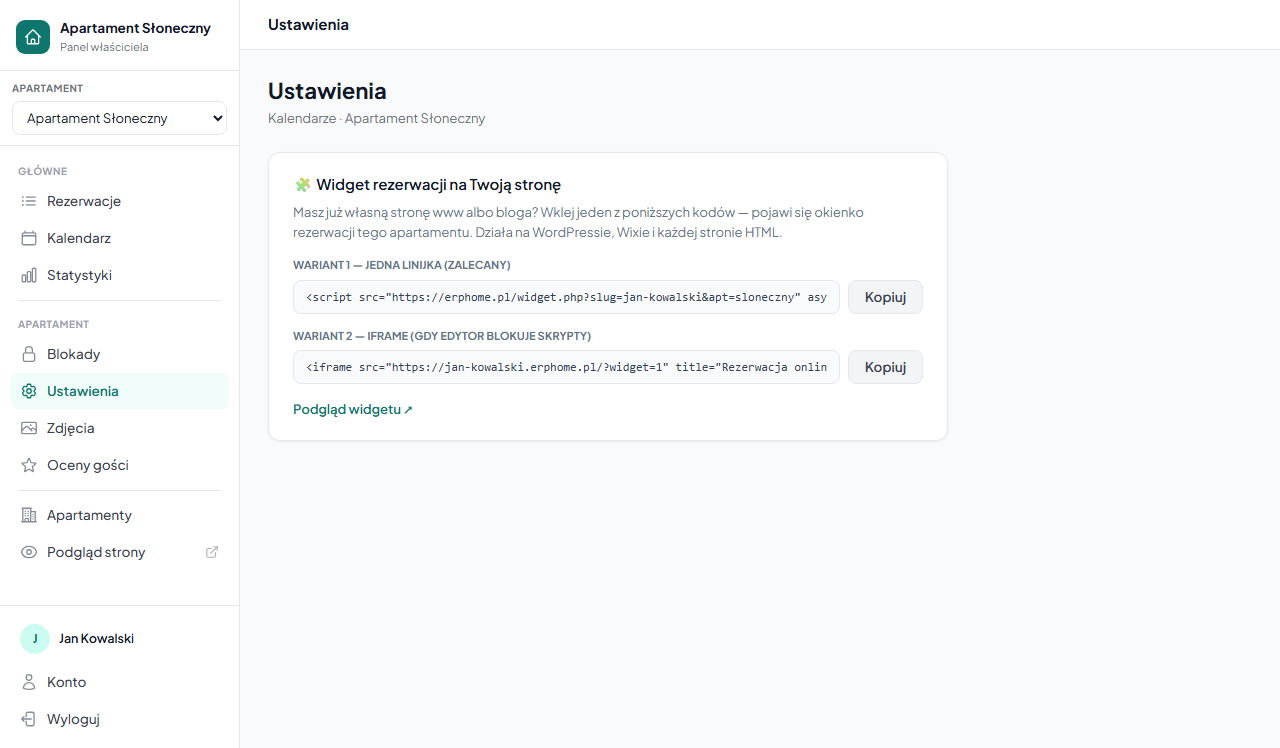
Variant 1: one line (recommended)
<script src="https://erphome.pl/widget.php?slug=YOUR-SLUG&apt=APARTMENT" async></script>Paste this line where the widget should appear on the page. The script inserts the booking box there itself and will never require updating: all widget improvements happen on our side.
WordPress: add a "Custom HTML" block and paste the line, or use the official plugin described below (no code to paste). HTML page: paste it anywhere in .
Variant 2: iframe (when the editor blocks scripts)
Some site builders (e.g. some Wix plans or company CMS editors) don't allow pasting scripts but do accept frames:
<iframe src="https://YOUR-SLUG.erphome.pl/?widget=1"
        title="Online booking" loading="lazy"
        style="width:100%;max-width:420px;height:430px;border:1px solid #e2e8f0;border-radius:14px"></iframe>
The effect is identical: only the embedding method differs.
WordPress: the official plugin
If your site runs on WordPress, instead of pasting code you can install our free plugin "erphome.pl: Widget Rezerwacji Apartamentu" (ErpHome: Booking Widget). It adds the widget via a block, a shortcode or a sidebar widget: without touching any HTML.
Setup takes a moment:
- In the WordPress admin, install and activate the "erphome.pl: Widget Rezerwacji Apartamentu" plugin.
- Go to Settings → ErpHome.
- Paste the "Widget preview ↗" link copied from your erphome.pl panel (Settings → Calendars) and save: the plugin detects the account and apartment slug automatically.
- Embed the widget in your content in one of four ways:
- the Gutenberg block "ErpHome: Booking Widget" with a live preview and an apartment picker in the editor sidebar, - the Elementor element: you drag it onto the page with the mouse like any other element, with the same settings (from plugin version 1.3.0, no manual shortcode needed), - the shortcode [erphome_widget]: works anywhere shortcodes are supported (posts, pages, text widgets, most page builders), - the classic sidebar widget for themes built around the Widgets screen.
Have several apartments? Point to one other than the default with the apt attribute:
[erphome_widget apt="dom-nad-morzem"]The same attribute is available on the Gutenberg block, the Elementor element and the sidebar widget. The plugin requires an active erphome.pl account: it displays the widget from your account, it does not create a new one. If you have iCal synchronization connected with Booking.com or Airbnb, the widget shows the same up-to-date availability as your booking page: with no separate configuration in WordPress.
How it works for the guest
- In the widget, the guest selects arrival and departure dates and the number of guests.
- The widget immediately checks availability: it knows your bookings, blocks and dates occupied on Booking.com/Airbnb (from iCal synchronization).
- After clicking "Check price and book", the guest lands on your full booking page: with the date already selected, the price calculated and the form ready. There they finish the booking (and any online payment).
The booking always finalizes on your erphome.pl page: so payments and confirmations work exactly the same, no matter where the guest came from.
Tips
- The widget color is inherited from the apartment's accent color (Settings → Apartment → Personalization).
- The widget shows a "from X PLN/night" price: the guest sees the full quote (seasons, discounts, additional fees) after continuing.
- Have several apartments? Embed several widgets: each with a different
apt=parameter. - You can see a widget preview via the "Widget preview ↗" link in the panel before pasting it onto your page.
Frequently asked questions
Which code variant should I use: script or iframe?
The one-line script variant is recommended: it inserts the box itself and never needs updating. Use the iframe variant only when your site builder (e.g. some Wix plans) blocks pasting scripts. The effect for the guest is identical.
Is there a WordPress plugin?
Yes, the free "erphome.pl: Widget Rezerwacji Apartamentu" plugin. It adds the widget via a Gutenberg block, an Elementor element, the [erphome_widget] shortcode or a sidebar widget: with no HTML to paste.
Where does a booking from the widget finalize?
Always on your erphome.pl booking page. The widget checks availability and carries the guest, with the date selected, to the form where they finish the booking and any online payment: exactly as if they had come to the page directly.
Related articles: How to check and share your booking page · Page personalization · Custom domain · Language versions of the page · How iCal synchronization works