erphome.pl supports two modes for accepting bookings: request mode (no payment) and online payment mode with the Przelewy24 gateway. You configure the gateway once for the whole account in Settings → Payments, and it applies to all your apartments.
Currently available gateway: Przelewy24. PayU and Stripe integration is in progress and will arrive in upcoming updates.
Request mode (default)
Without a configured payment gateway, a booking works as a request:
- The guest fills in the form and clicks "Send request"
- The system saves the booking with the status Pending
- You receive an email notification and/or Telegram
- You manually confirm or reject the booking in the panel
- The guest receives an email about the status change
This mode works well when you want to verify each guest before confirming.
Online payment mode
After configuring a payment gateway, the flow looks as follows:
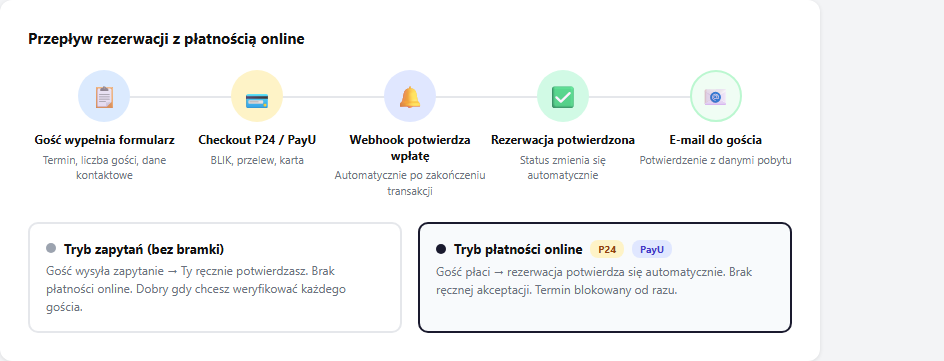
- The guest fills in the form and clicks "Book and pay"
- The system saves the booking with the status Awaiting payment and redirects the guest to the gateway page
- The guest pays (BLIK, transfer, card)
- The gateway sends a webhook to erphome.pl confirming the payment
- The booking automatically changes status to Confirmed
- The guest sees the "Booking confirmed! ✅" screen and receives a confirmation email
The webhook works independently of the guest, the booking will be confirmed even if the guest closes the browser right after paying.
What happens if the guest abandons payment
If the guest leaves the gateway page without paying (clicks "Back" or closes the tab), the booking stays with the status Awaiting payment. The date is blocked in the calendar until:
- The guest returns to the page and completes the payment (the link is active for the duration of the session)
- Or you cancel the booking in the panel: open it and click "✕ Cancel booking". A cancelled booking immediately frees the date in the calendar.
Available gateways
| Gateway | Status | Payment methods |
|---|---|---|
| Przelewy24 | ✅ Available | BLIK, fast transfer, traditional transfer, card, Google Pay |
| PayU | 🔜 Soon | BLIK, fast transfer, traditional transfer, card, Google Pay, Apple Pay |
| Stripe | 🔜 Soon | Card, BLIK (via Stripe) |
The gateway is configured once for the whole account and applies to all apartments. Until you configure a gateway, the booking page stays in request mode.
Webhook URL: what it is and what it's for
A webhook is a URL that the payment gateway calls after confirming a payment. erphome.pl uses webhooks to automatically change the booking status. The guest webhook address looks like this:
https://erphome.pl/payments/booking_webhook.php?tenant={slug}&apt={apt_slug}Where {slug} is your account identifier and {apt_slug} is the apartment identifier.
How you set it up depends on the gateway. With Przelewy24 (currently the only available gateway) you set up nothing: erphome.pl passes the notification address to P24 with every transaction, so the webhook works automatically. With PayU (in preparation) you enter the notification address manually in the gateway panel, the exact URL will then be shown under Settings → Payments after you select PayU.
Amount verification
The system verifies whether the amount paid by the guest matches the booking amount. If the guest pays less than the calculated price, the booking will not be confirmed automatically, and you'll find it in the panel with the status Awaiting payment and can decide manually.
Payment links for guests (without the form)
Besides the automatic mode, you can also generate a one-time payment link and send it to the guest manually, useful when the booking was added manually by you or when you want to collect the deposit separately. The links are available on the booking details page in the panel, together with the payment history and the option to record a payment manually. Details: Payments in a booking.
Frequently asked questions
Will the booking confirm if the guest closes the browser after paying?
Yes. Confirmation is triggered by a webhook the gateway sends independently of the guest, the status changes to Confirmed even if the guest closes the tab right after paying.
What happens if the guest abandons payment?
The booking stays with the Awaiting payment status and the date remains blocked in the calendar. The guest can return and finish paying while the session lasts, or you cancel the booking in the panel, and cancelling frees the date immediately.
Do I have to configure the gateway separately for each apartment?
No. You set the gateway once for the whole account in Settings → Payments and it applies to all apartments. With Przelewy24 the notification address is passed automatically with every transaction (separately for each apartment), so you don't configure it manually. A separate notification entry on the gateway side only applies to PayU when you split apartments.
Related articles: Przelewy24 configuration · Payments in a booking: history and links · Deposit (refundable) · PayU configuration · Stripe configuration · How the booking process works