Promo codes are one-time or multi-use codes that the guest enters in the booking form to get a discount. Useful for rewarding regular customers, marketing campaigns or group discounts.
Where to set it
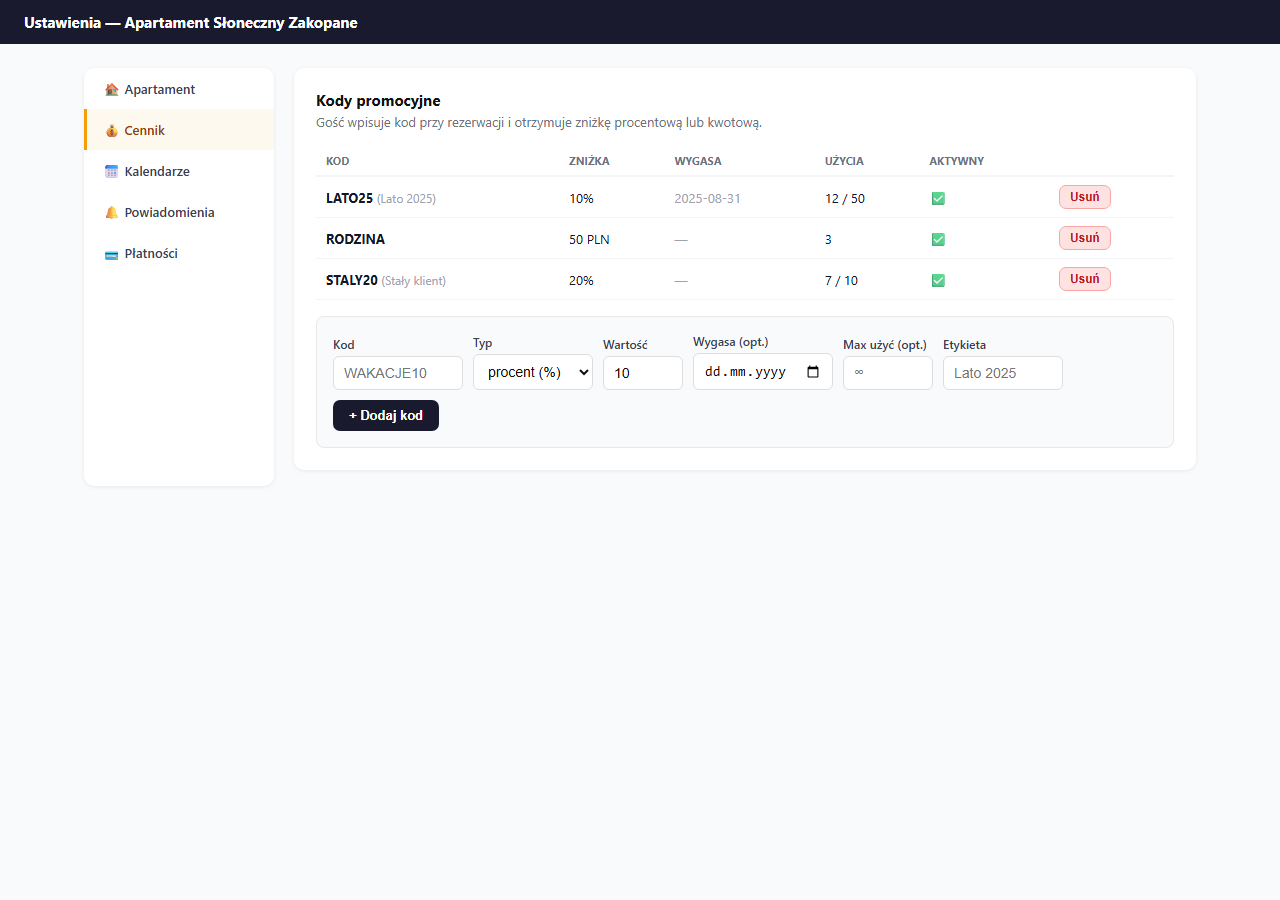
Settings → Pricing → the "Promo codes" card.
How the guest uses a code
In the booking form, below the contact fields, the guest has a "Promo code (optional)" field. They enter the code (the text they type is automatically converted to uppercase) and submit the booking.
The "Promo code" field appears only when you have at least one usable code: active, not yet expired and with uses left. Once all codes expire or hit their limit (or when you have none), the field disappears so guests aren't tempted to hunt for a discount that doesn't exist. Add or unlock a code and the field comes back automatically.
The code is checked on form submission: the discount is calculated server-side and shows up in the booking's price summary and in the confirmation email. The live price preview in the form shows the long-stay discount and the last-minute discount, but does not deduct the promo code on the fly, the code only takes effect after the form is sent.
If the code is invalid, the form does not submit the booking and shows a message:
- "Nieznany kod promocyjny." (Unknown promo code): the code doesn't exist or was deleted
- "Kod promocyjny wygasł." (Promo code expired): the expiry date has passed
- "Kod promocyjny został wyczerpany." (Promo code used up): the usage limit was reached
The guest can then fix the code or submit the booking without it (the field is optional). A code's usage is only counted after the dates are confirmed as available, a failed booking does not "burn" one of the available uses.
Code parameters
Code: a string of letters, digits, hyphens and underscores, 2–20 characters, automatically converted to uppercase. Examples: SUMMER25, LOYAL20, FAMILY.
Discount type:
%: a percentage discount off the accommodation amount (excluding additional fees)PLN: a fixed amount subtracted from the accommodation amount (like the percentage type, excluding additional fees). If the code's value exceeds the accommodation alone, the discount is capped at the accommodation amount; additional fees (e.g. cleaning) always remain payable.
Value: a number (percent or PLN).
Expires: an optional validity date. After this date the code stops working automatically.
Max uses: an optional limit on the number of bookings the code can be used for. An empty field = no limit.
Label: a private note visible only in the panel (e.g. "Guests from Instagram").
Code examples
| Code | Type | Value | Limit | Use |
|---|---|---|---|---|
SUMMER25 | % | 10% | 50 uses, until 31.08 | Summer campaign |
LOYAL20 | % | 20% | 10 uses | Regular customers |
FAMILY | PLN | 50 PLN | no limit | Families with children |
NEWYEAR | % | 5% | 5 uses, until 31.12 | New Year's |
Usage tracking
In the Uses column you see how many times a code has been used (and the limit if set). Monitor popular codes: if a limit is running out, create a new code or remove the limit.
Adding a code
- Enter the Code: only letters, digits,
_and-. - Choose the Type: percent or amount.
- Enter the Value.
- Optionally: expiry date, usage limit, label.
- Click "+ Add code".
Removing
Click "Delete" and confirm. A deleted code stops working immediately, bookings made with that code are not modified.
A code can't be edited after it's added: if you make a mistake, delete it and add a new one with corrected data.
Frequently asked questions
Why doesn't the guest see the promo code field?
The field appears only when you have at least one usable code: active, not yet expired and with uses left. Once all codes expire or hit their limit, the field disappears. Add or unlock a code and it comes back automatically.
Does a code also reduce additional fees?
No. The discount (percentage and fixed-amount) applies only to the accommodation amount. Additional fees, such as cleaning, always remain payable. If a fixed-amount code exceeds the accommodation alone, the discount is capped at the accommodation amount.
Can I edit a code after adding it?
No. A code can't be changed: if you make a mistake, delete it and add a new one with corrected data. Deletion takes effect immediately, and bookings already made with that code stay unchanged.
Related articles: Long-stay discount · Last-minute discount · Base price and day-of-week prices · Price suggestions based on occupancy