The base price is the rate that applies when no day-of-week or seasonal price is set for a given day. It's the starting point for the whole pricing structure.
Where to set it
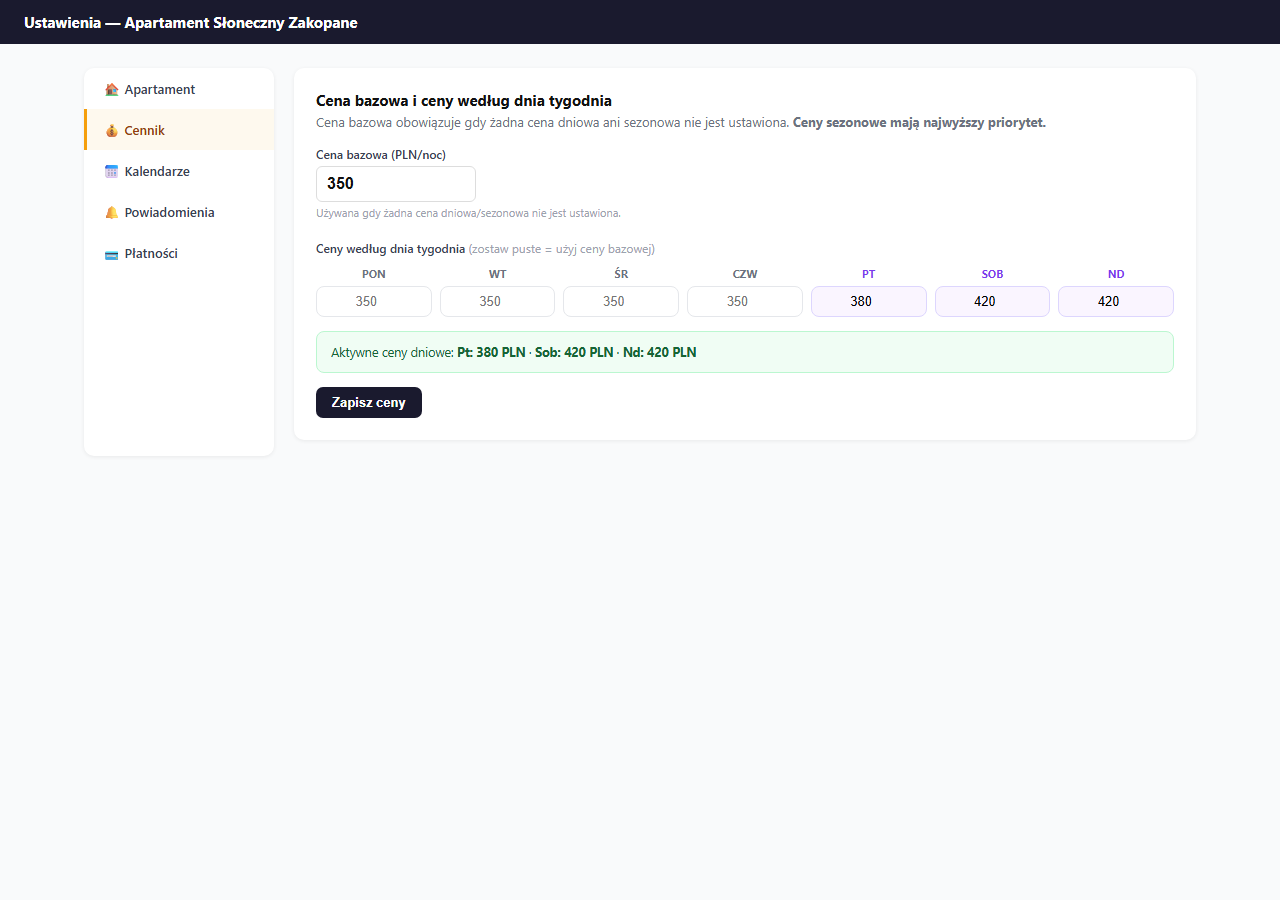
Settings → Pricing → the "Base price and day-of-week prices" card.
Price priority: what applies when
The system applies prices in a strict hierarchy:
- Seasonal price: the highest priority, overrides everything else (e.g. Summer: 520 PLN)
- Day price: a specific rate for a day of the week (e.g. Saturday: 420 PLN)
- Base price: the fallback when no rule matches (e.g. 350 PLN)
Example: if you have Summer 520 PLN and Saturday 420 PLN, on a summer Saturday 520 PLN applies (seasonal wins).
Base price
Enter the rate in the "Base price (PLN/night)" field and click "Save prices". This is the minimum price guests will see off-season on weekdays.
A good starting point: check how much similar apartments in your area cost on Booking.com mid-week, off-season.
Day-of-week prices
Weekend days (Fri, Sat, Sun) are highlighted with a purple background, a reminder that they usually differ from weekdays.
Rule: leave a field empty = use the base price. Enter a value = override the base price for that day.
Example configuration for an apartment at 350 PLN/night:
| Day | Price | Logic |
|---|---|---|
| Mon–Thu | (empty) | 350 PLN, base price |
| Friday | 380 PLN | +30 PLN, start of the weekend |
| Saturday | 420 PLN | +70 PLN, peak demand |
| Sunday | 420 PLN | +70 PLN, like Saturday |
After saving, the panel shows a green bar with the active day prices, check that the values are correct.
Saving
Click "Save prices": this form saves only the base and day prices (a separate save from the rest of the settings).
Frequently asked questions
What applies when a day has both a seasonal and a day price set?
The seasonal price wins, it has the highest priority and overrides the day and base prices. Example: with Summer 520 PLN and Saturday 420 PLN, on a summer Saturday the guest pays 520 PLN.
How do I set a different price for the weekend?
In the "Base price and day-of-week prices" card, enter a value in the Friday, Saturday or Sunday field. An empty field means "use the base price", and an entered amount overrides the base for that day of the week.
Does saving base prices also save the rest of the pricing?
No. The "Save prices" button saves only the base and day prices. Seasonal prices, surcharges and discounts have their own save buttons on their own cards.
Related articles: Seasonal prices · Extra-guest surcharge · Additional fees · Long-stay discount · Last-minute discount · Promo codes · Price suggestions based on occupancy