Additional fees are amounts added to the accommodation price: e.g. final cleaning, parking, allowing a pet. You can choose whether they're mandatory (always charged) or optional (the guest selects them when booking).
Where to set it
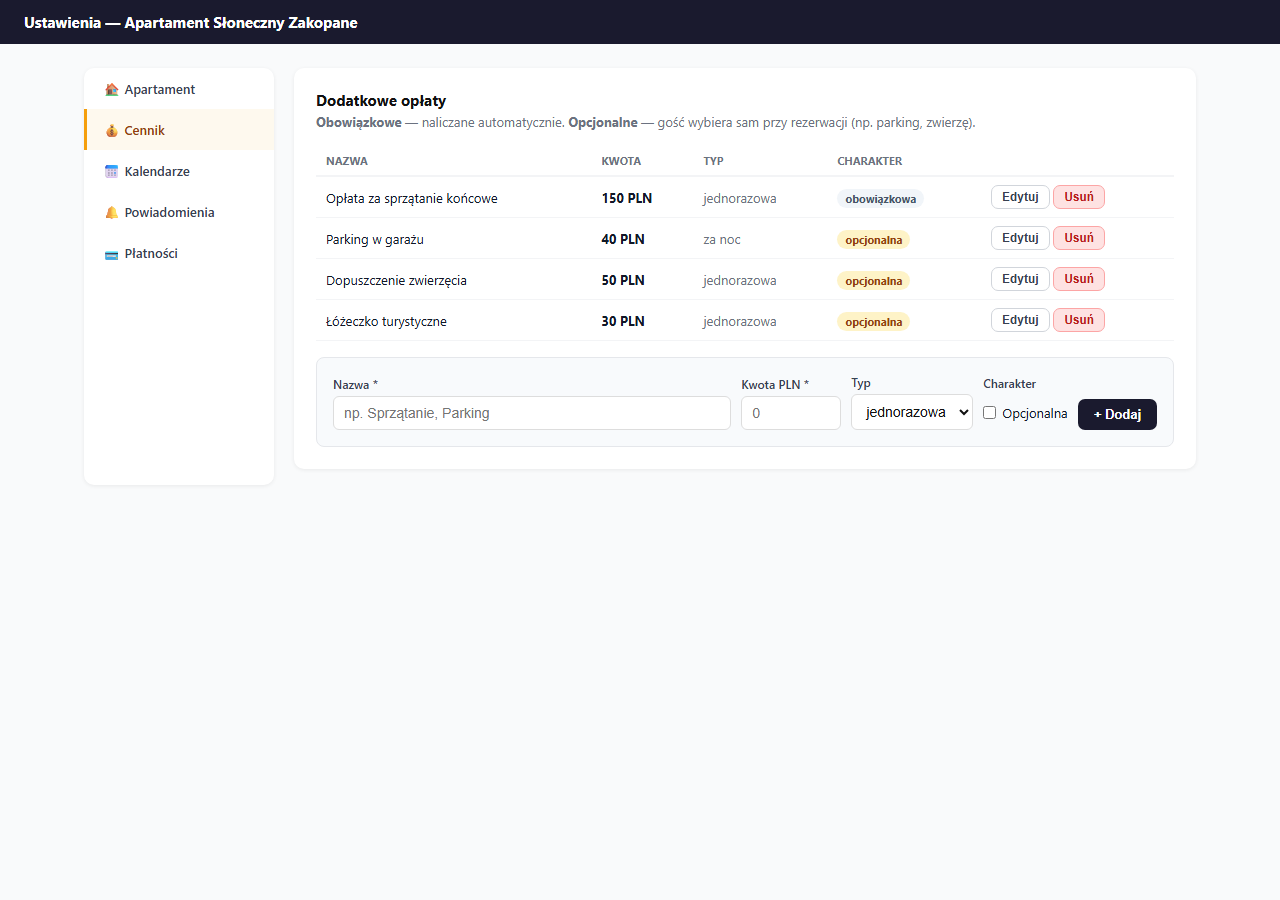
Settings → Pricing → the "Additional fees" card.
Two charging types
One-time: added once to the whole stay, regardless of the number of nights. Example: a 150 PLN cleaning fee whether the guest stays 2 or 14 nights.
Per night: added to each night of the stay. Example: parking 40 PLN/night, for 7 nights the guest pays an extra 280 PLN.
Mandatory vs. optional
Mandatory: automatically added to every booking; the guest can't remove it. Use it for fees you always charge (e.g. final cleaning, a service fee). Don't add the deposit here: it's a separate mechanism (see the section below).
Optional: appears as a checkbox next to the booking form with a description and amount. The guest ticks what they want, e.g. parking or a travel cot.
Configuration examples
| Name | Amount | Type | Nature |
|---|---|---|---|
| Final cleaning fee | 150 PLN | one-time | mandatory |
| Garage parking | 40 PLN | per night | optional |
| Pet allowance | 50 PLN | one-time | optional |
| Travel cot | 30 PLN | one-time | optional |
| Premium towels | 20 PLN | one-time | optional |
How the guest sees it
On the booking page, after selecting dates, the price summary shows the breakdown:
- Accommodation price: 350 PLN × 7 nights = 2,450 PLN
- Cleaning fee: 150 PLN (mandatory)
- Parking: 280 PLN (optional, if ticked)
- Total: 2,880 PLN
The guest sees all fees before submitting the booking, no surprises at check-out.
Adding a fee
- Enter the Name: it will be visible to the guest when booking.
- Enter the Amount PLN.
- Choose the Type: one-time or per night.
- Tick Optional if the guest should have a choice; leave it unchecked for mandatory ones.
- Click "+ Add".
Editing a fee
Click "Edit" next to the chosen fee: the edit form appears in place of the row. Change the values and click "Save".
Removing
Click "Delete" and confirm. The removal is immediate, the fee disappears from future bookings (existing ones are not modified).
A deposit is not an additional fee
A deposit (refundable) works separately from additional fees: it doesn't appear in the price calculation, but is tracked independently in the panel with its own status cycle (pending → paid → returned). You set it in Settings → Pricing → Deposit. Details: Deposit (refundable).
Frequently asked questions
What's the difference between a mandatory and an optional fee?
A mandatory fee is added automatically to every booking and the guest can't remove it, use it for things like final cleaning. An optional fee appears as a checkbox next to the form; the guest decides whether to add it (e.g. parking, a travel cot).
Do I add the deposit as an additional fee?
No. The deposit is a separate mechanism: it doesn't enter the price calculation and has its own status cycle. You set it in Settings → Pricing → Deposit, not in the additional-fees list. Details: Deposit (refundable).
Does editing or removing a fee change existing bookings?
No. The change applies only to future bookings, fees saved on already-submitted bookings stay unchanged.
Related articles: Extra-guest surcharge · Promo codes · Long-stay discount · Deposit (refundable)