On the Statistics page, above the monthly table, a "💡 Price suggestions for the coming months" box may appear. These are hints calculated from your historical data: the system compares upcoming months with occupancy in the same month a year earlier.
A suggestion is a hint, not an automation. The system changes nothing on its own. You set prices manually in the apartment Settings.
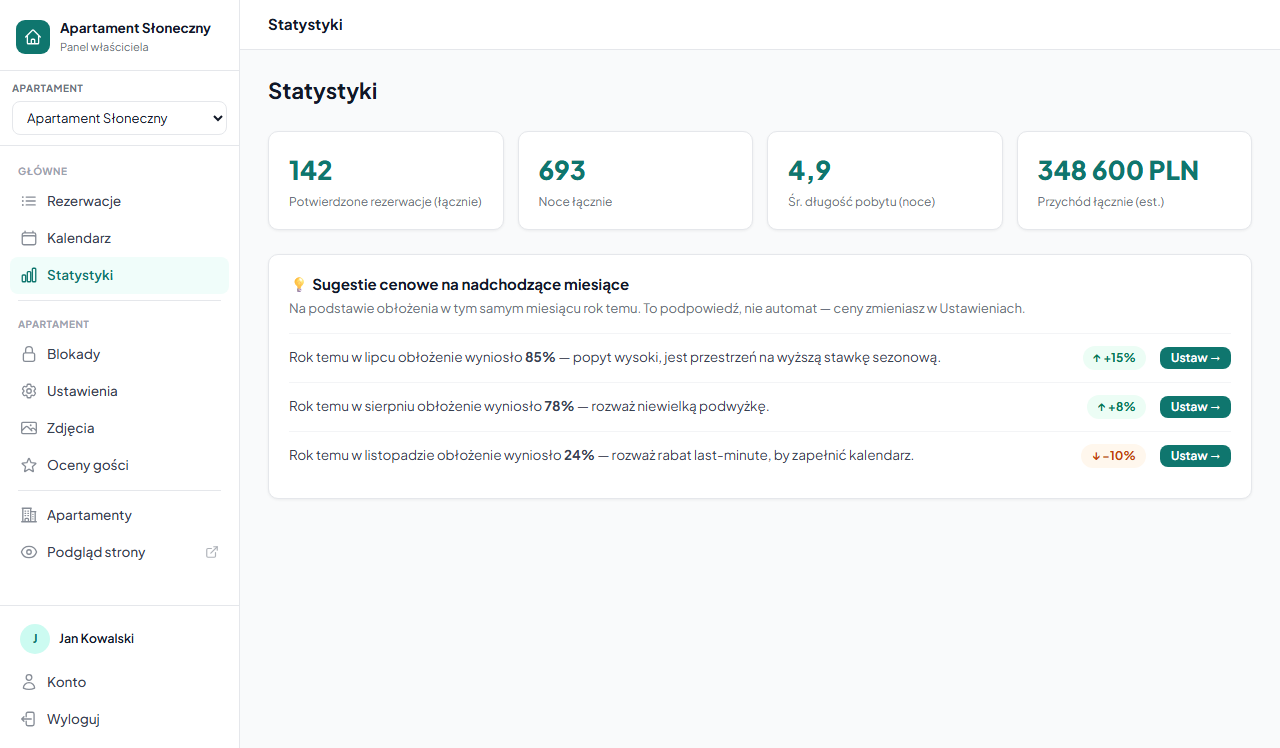
How suggestions work
The system looks at the 3 upcoming months. For each, it checks the occupancy in the same month a year ago and suggests accordingly:
| Occupancy a year ago | Suggestion |
|---|---|
| 80% and above | ↑ Consider raising the price by about +15% (seasonal pricing) |
| 60–79% | ↑ Consider raising the price by about +8% |
| 31–59% | No suggestion: occupancy is normal |
| 30% and below | ↓ Consider a promotion or last-minute discount of about −10% to fill the calendar |
Example: it's April, and last July occupancy was 85%. Next to the Jul row you'll see a suggestion to raise the price by about +15%: demand for July was high, so there's room for a higher rate.
The "Set →" button next to each suggestion leads straight to the apartment settings, where you change seasonal prices or enable a last-minute discount.
When suggestions don't appear
The box is visible only when the system has something to work with. You won't see suggestions when:
- The apartment has been running for less than a year: no data from the comparable month a year ago
- There were no bookings in the reference month: a month with no bookings is skipped, because zero occupancy a year ago (e.g. before you started renting) isn't a signal for a promotion
- Occupancy a year ago was within the 31–59% range: that's a normal level; the system has no reason to suggest anything
How to implement a suggestion
An increase suggestion: add a date range with a higher price in the seasonal pricing. The increase applies only to the indicated month; the base price stays unchanged.
A promotion suggestion: you have a few options:
- Last-minute discount: an automatic reduction for bookings close to the arrival date
- Promo code: a discount for guests you send a code to (e.g. returning ones)
- A lowered seasonal price for that month in the seasonal pricing
Where the system gets occupancy data
Occupancy is calculated the same way as in the monthly statistics table: nights from confirmed bookings divided by the number of days in the month. OTA bookings synced via iCal block the calendar but don't create bookings in the system. If you take most bookings on Booking.com or Airbnb, also add them as manual bookings so the statistics and suggestions reflect actual occupancy.
Frequently asked questions
Why don't I see the price suggestions box?
The box appears only when the system has data to compare. You won't see it when the apartment has been running for less than a year, the reference month a year ago had no bookings, or occupancy a year ago was within the normal 31–59% range.
Does the system change prices from the suggestions on its own?
No. A suggestion is only a hint: the system changes nothing automatically. You set prices manually, and the "Set →" button takes you to seasonal prices or the last-minute discount.
Where does the system get the occupancy data for suggestions?
From confirmed bookings in the system (as in the statistics table). OTA bookings via iCal block the calendar but don't create bookings. If you take most of them on Booking.com or Airbnb, also add them as manual bookings so the suggestions are accurate.
Related articles: Statistics: revenue and occupancy · Seasonal prices · Last-minute discount · Promo codes