From the panel you can send any email to the guest without leaving for your mailbox. Messages are archived in the booking history.
Where to send a message
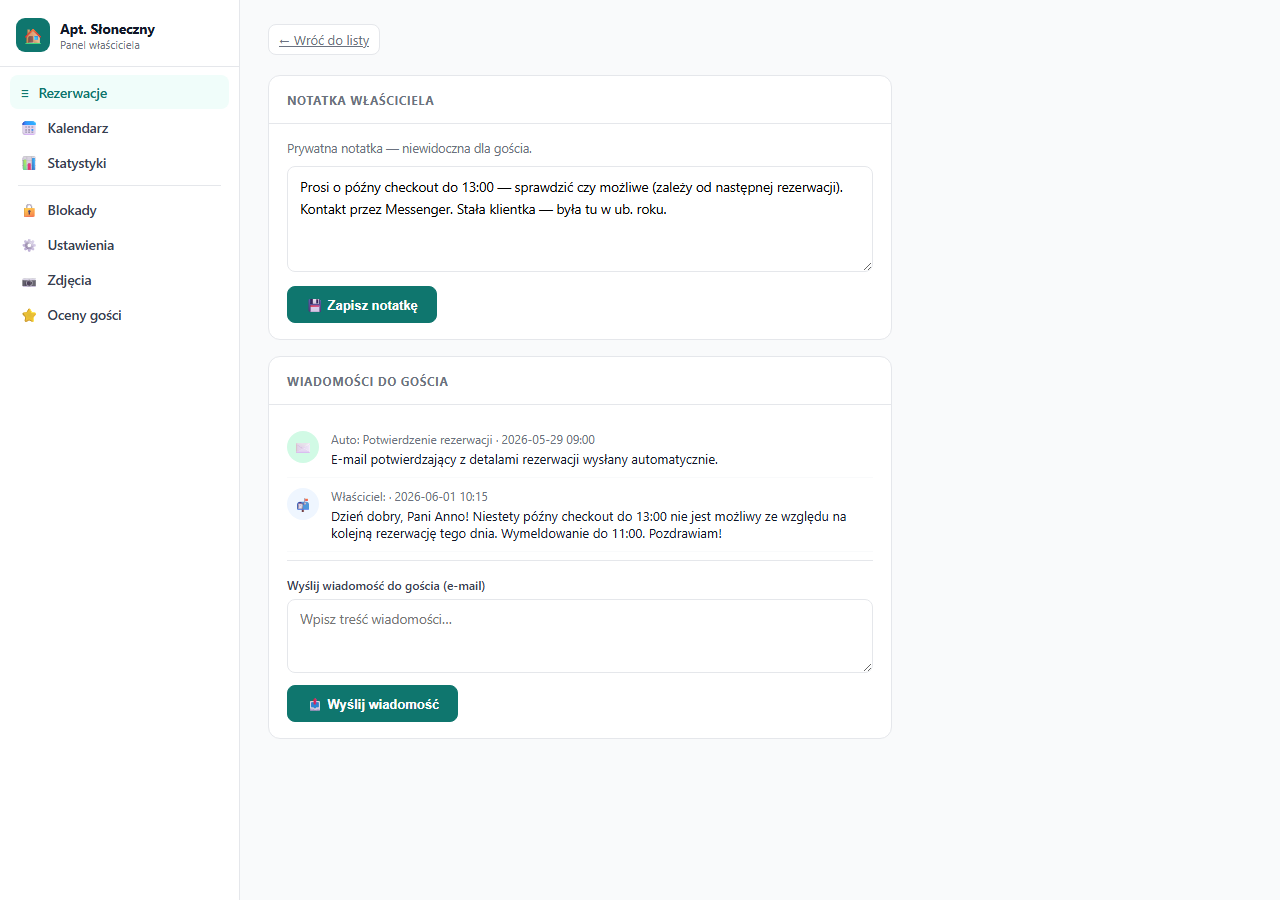
Open the booking details → the "Messages to the guest" section (bottom of the right column or the lower part of the page).
How it works
- Enter the message content in the text field.
- Click "📤 Send message".
- The guest receives an email with your message. The sender is the erphome.pl address, but your name and the apartment name are shown in the email body.
The message also appears in the history section on the booking details page. You can see when and what you sent.
Message history
Below the form there's a list of all messages sent to this guest within this booking, in chronological order. It includes both manual messages and automatic ones (confirmation, cancellation, date change).
Next to each message, the send date/time and type (auto / owner) are shown.
When to send messages
Typical situations:
- Replying to a guest message from the contact form on the page (e.g. a late check-out question), though you usually answer those straight from email.
- Additional pre-arrival information: how to get there, where to park, the emergency phone number.
- Confirming arrangements: when you changed the terms by phone and want a written record.
- A check-out time reminder: the day before departure.
- A review request: after the stay ends.
Limitations
- You can't receive the guest's reply through the panel: the guest replies directly to your owner email address (configured in Notifications → recipient address).
- Messages sent through the panel don't support formatting (HTML, bold, lists): they're sent as plain text.
- There's no attachment option.
If the guest replies to a panel email, the reply goes to your owner address, a standard mailbox, not the erphome.pl panel.
Frequently asked questions
Where does the guest's reply to a panel message go?
To your owner address configured in Notifications → recipient address, that is, to your ordinary mailbox, not the panel. The panel sends messages but doesn't receive replies.
Can I attach a file or make the text bold?
No. Panel messages are sent as plain text, without HTML formatting and without attachments. Send a file separately from your own mailbox by replying to the guest at their address.
Which sender does the guest see?
The sender field shows the erphome.pl address, but in the message body the guest sees your name and the apartment name, so they know the owner is writing to them.
Related articles: Messages from a guest: the contact form · Owner notes · Which emails the guest receives