Sometimes the dates or number of guests have to change: a guest asks to shift the stay or add a person. Editing a booking lets you update this data without cancelling and creating a new booking.
Where to edit
You edit a booking from the booking list on the panel dashboard. Each non-cancelled booking has a purple "Edit" button that opens the edit window.
A single booking's details page has no option to change dates or the guest count: that page is for status, payments, the deposit and notes. To change the dates or number of guests, go back to the booking list and click "Edit" on the row.
The edit form
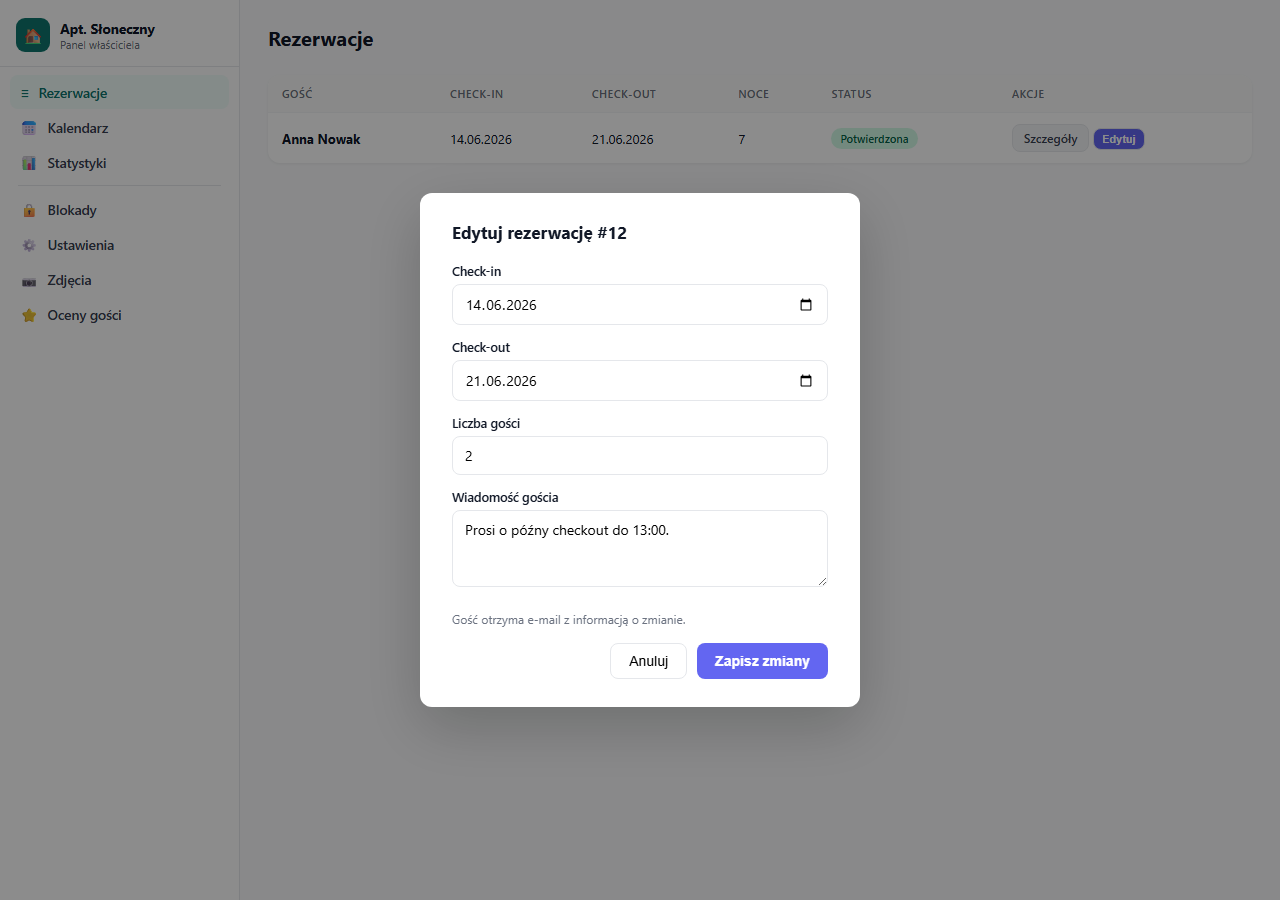
After clicking "Edit", a modal window opens with fields:
- Check-in: the new arrival date
- Check-out: the new departure date
- Number of guests: the updated number of people
- Guest message: you can also update the message content
Click "Save changes": the system updates the booking and automatically sends the guest an email about the change.
What the guest gets after a change
The guest receives an email with the new schedule:
- Updated check-in and check-out dates
- Updated number of nights
- Any change in amount (if the dates or guest count changed)
Changing the dates doesn't automatically recalculate the amount in the database. The amount is saved as the value from the original booking submission. If you want to set a new amount, contact the guest separately and explain the difference.
When editing isn't possible
Editing is unavailable for bookings with the Cancelled status, so instead restore the booking to Pending or Confirmed, then edit.
Alternative: cancel and a new booking
If the change is large (a different apartment, very different dates), consider cancelling the existing booking and asking the guest to submit a new one through the booking page. That way the whole price calculation will be correct.
After editing, send the guest a message from the panel confirming the change.
Frequently asked questions
Does editing the dates recalculate the amount?
No. The amount is saved from the original booking submission. Changing the dates or guest count doesn't recalculate it automatically in the database. You set a new price with the guest separately and explain the difference.
Why don't I see an edit option on the booking details page?
You change dates and the guest count only from the booking list, using the purple "Edit" button. The details page is for status, payments, the deposit and notes. It has no date fields.
Can I edit a cancelled booking?
No. For the Cancelled status the edit button is unavailable. First restore the booking to Pending or Confirmed, then open the edit window.
Related articles: Confirming and cancelling bookings · Payments in a booking: payment history · Message to the guest · How the booking process works · Reservation activity log