Every reservation has a "History" section: a chronological record of what happened to it, starting from submission. This is where you check whether your notifications actually reached the guest and you, without guessing.
Where to find it
Reservations → click a reservation → the "History" section in the right column (below the owner note).
Entries are ordered newest-first, each with an icon, a description and a timestamp down to the minute. If a reservation is brand new and nothing has happened yet, you'll see "No history".
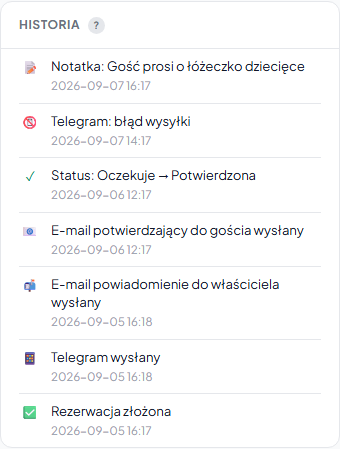
What the log records
| Icon | Event | What it means |
|---|---|---|
| ✅ | Reservation submitted | The guest sent the form, or you added a manual booking |
| ✓ | Status → Confirmed | The reservation was confirmed (by you or automatically after payment) |
| ✕ | Status → Cancelled | The reservation was cancelled |
| ↩ | Status → Pending | The reservation returned to the pending state |
| 📱 | Telegram sent | The Telegram notification about the reservation was sent to you |
| 📧 | Confirmation email to guest sent | The guest received the automatic email about the reservation |
| 📬 | Owner notification email sent | The email notification reached your address |
| 📝 | Note | You saved an owner note |
Payment-related entries also appear in the log: generating a link, an online payment by the guest and a manually recorded payment. The Payments in a booking article describes these in detail.
Delivery statuses: the most important part
Notification entries state plainly whether the send succeeded:
- Telegram sent / Telegram: send failed
- Confirmation email to guest sent / Email to guest: error
- Owner notification email sent / Email to owner: error
When a guest claims they didn't receive a confirmation, look here first. A "sent" entry means the system handed the message off for delivery correctly. If it still didn't arrive, the cause is usually a spam filter or a typo in the guest's address. An "error" entry means the send failed on our side.
A common reason for a missing "Telegram sent" entry is an unlinked account: check your Telegram connection and troubleshooting. If the email to the guest repeatedly ends in an error, make sure the reservation has a correct address.
History vs. correspondence
History is a log of system events (what happened and when). It is different from "Correspondence with the guest" below it, where you see the content of messages sent to the guest and received from them. Together, the two sections give the full picture of a single reservation.
Frequently asked questions
A guest says they didn't get a confirmation, how do I check?
Look at the "History" section on that reservation. A "Confirmation email to guest sent" entry means the system handed the message off for delivery correctly. If it still didn't arrive, the cause is usually a spam filter or a typo in the guest's address. An "error" entry means the send failed on our side.
What does a missing "Telegram sent" entry mean?
Most often an unlinked or disconnected Telegram account. Check your Telegram connection and troubleshooting, once it's linked correctly, later reservations will log a send entry.
How does history differ from correspondence with the guest?
History is a log of system events: when the reservation was submitted, when the status changed and whether notifications were sent. The correspondence below shows the content of messages to the guest and from the guest. Together they give the full picture of a reservation.
Related articles: Confirming and cancelling · Which emails the guest receives · Email notifications · Telegram connection · Payments in a booking · Message from the guest