erphome.pl sends guests several emails automatically, with no action on your part. As the owner you can't disable them, but you can make them complete by keeping the apartment data filled in (address, hours, check-in instructions).
Overview of all automatic emails
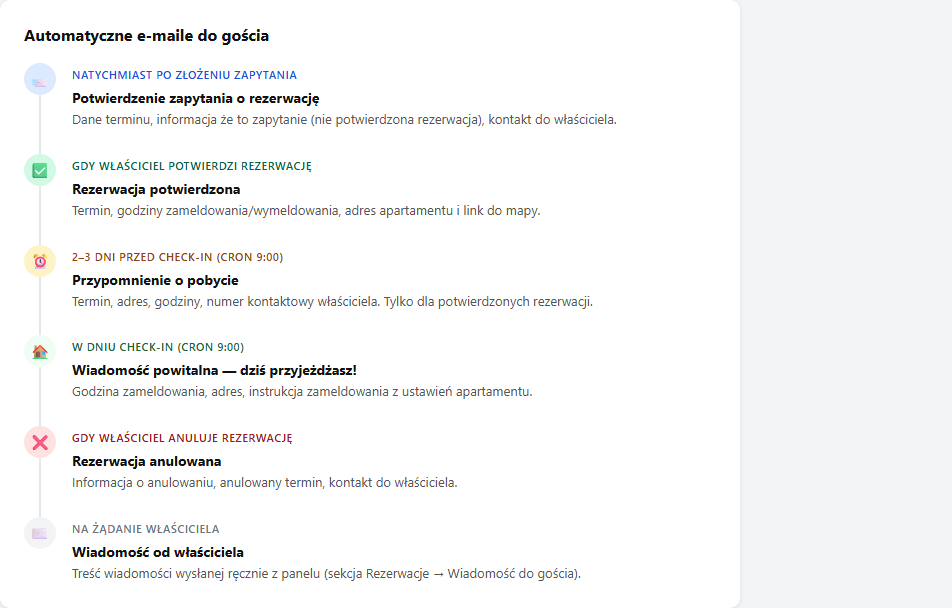
| When sent | Email subject | What it contains |
|---|---|---|
| Immediately after a request is submitted | "Booking request – [apt name]" | Confirmation the request was received, date details, a reminder that it's not yet a confirmed booking |
| When you confirm a booking | "Booking confirmed ✅ – [apt name]" | Dates, check-in/check-out hours, address and a map link |
| When you cancel a booking | "Booking cancelled – [apt name]" | Cancellation info, dates, the owner's contact |
| 2–3 days before check-in | "Stay reminder – [apt name]" | Dates, address, hours, the owner's contact number |
| On check-in day (morning) | "See you today – [apt name]" | Check-in time, address, check-in instructions, contact |
| When you send a message from the panel | "Message from the owner – [apt name]" | Your message content, the option to reply |
| When you edit a booking | "Booking update – [apt name]" | New dates and guest count |
| After the check-out date | "How was your stay? – [apt name]" | A review request with a one-time link to the form |
Details of selected emails
Request confirmation
Sent immediately after the guest submits the booking form. The email states that this is a request (not a confirmed booking) and that the owner will be in touch to confirm.
The Reply-To address in this email is your owner address. The guest can click "Reply" and write to you directly.
Booking confirmation and cancellation
Sent automatically when you change a booking's status in the panel to Confirmed or Cancelled (the Bookings → booking details section).
The confirmation email contains the apartment address and check-in/check-out hours from the apartment configuration. Fill in this data in Basic information so the guest has everything in one place.
Pre-arrival reminder
Sent 2 or 3 days before check-in by a cron that runs daily at 9:00. It works only for bookings with the Confirmed status: pending requests don't get a reminder.
The email contains the owner's contact phone number (from Account → Profile details). If it's not there, the phone field in the email is empty. Fill in the number so the guest can contact you in case of arrival problems.
Welcome message (arrival day)
Sent on check-in day by the same cron (at 9:00). It contains the check-in instructions from Settings → Apartment → the "Check-in instructions" card: a description of how to get the keys, the box code, what to check on entry.
Set the check-in instructions: it's the most important practical information for the guest, reaching them on exactly that day.
Email appearance
All emails have a consistent look: a white card on a gray background, the accent color from Personalization, the apartment name in the header. At the bottom of each email there's a footer with the platform name.
Can I customize the email content?
For now the email template content is fixed. There's no template editor in the panel. You influence the content by filling in the apartment data:
- Address and Google Maps link → appears in the confirmation email
- Check-in/check-out hours → appear in the confirmation and reminder
- Check-in instructions → appear in the welcome message
- Owner's phone number → appears in the reminder (fill it in under Profile details)
Related articles: Email notifications for the owner · Check-in instructions · Message to the guest from the panel · Messages from a guest (contact form) · How to connect your account to Telegram · Reservation activity log