erphome.pl gives you full control over your data: at any time you can download a complete copy of it in a single file, and you can delete your account yourself, without contacting support. Both options comply with the right of access and data portability (GDPR, articles 15 and 20) and the right to be forgotten (article 17).
Both operations are available to the account owner only. Panel users (reception, cleaning, accounting) do not see them.
Where to find it
Sign in to the panel and click My account in the left menu. Scroll to the bottom of the Security tab: you'll find two cards there: Download my data and a red Delete account card.
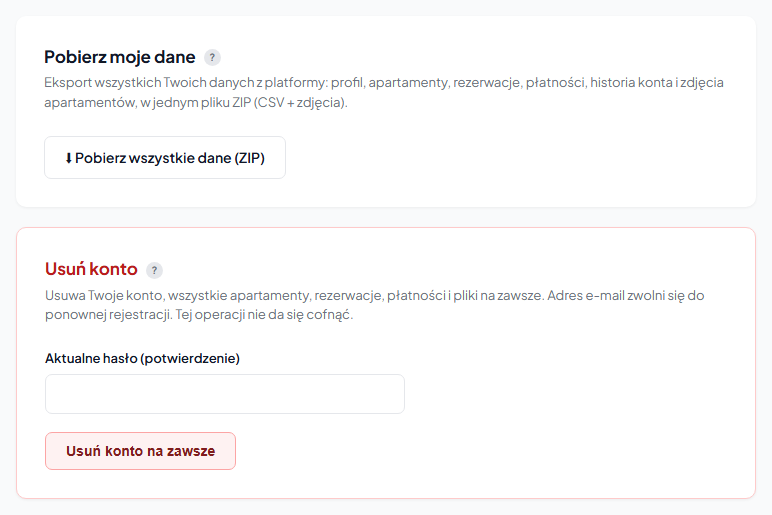
Downloading your data: ZIP export
Click "⬇ Download all data (ZIP)". After a moment your browser downloads a file named erphome-dane-YOUR-SLUG-YYYY-MM-DD.zip with a complete set of account information.
Inside the archive you'll find CSV files and a folder with photos:
| File | What it contains |
|---|---|
profil.csv | Company and owner details: name, email, phone, tax ID (NIP), address, account status |
apartamenty.csv | Full configuration of each apartment (descriptions, prices, amenities) |
rezerwacje.csv | All bookings across every apartment |
platnosci_rezerwacji.csv | Payments and deposits linked to bookings |
wiadomosci_rezerwacji.csv | Messages exchanged with guests |
log_rezerwacji.csv | Booking event history (statuses, notifications) |
abonamenty.csv | Subscription and billing-period history |
historia_konta.csv | Account log: suspensions, domain changes, payments |
uzytkownicy_panelu.csv | People with panel access and their permissions |
zdjecia/ | Original photos of each apartment, in per-apartment subfolders |
The CSV files are UTF-8 with BOM. You can open them directly in Excel, Numbers or Google Sheets without setting the encoding.
The export does not include your password, 2FA secret or Google/Microsoft login tokens. These are internal security credentials, not portable personal data, so we deliberately leave them out of the file.
You can download the export as many times as you like. It's good practice to download it before deleting your account. Once the data is gone, it cannot be recovered.
Deleting your account
The Delete account card permanently erases your account together with all apartments, bookings, payments, messages and photos. Your email address is freed up for a fresh registration.
To delete your account:
- In the "Current password (confirmation)" field, enter your password.
- Click "Delete account permanently".
- Confirm in the browser dialog.
This operation cannot be undone. You will lose access to all apartments, bookings and payment history. If you have any doubts, first download the data export from the "Download my data" card above.
When deletion makes sense
Only delete your account if you're genuinely leaving the platform. If you merely want to pause payments for a while, don't delete it, simply don't renew your subscription. The account moves to a suspended state and the booking page goes offline, but your data and configuration stay intact in case you come back.
Suspended accounts are automatically and permanently deleted 60 days after suspension (GDPR-compliant data retention). So if you don't plan to return within two months, the data will be erased anyway. You don't have to do it manually. More on renewing: How to renew your subscription.
Frequently asked questions
What's in the ZIP data export?
CSV files (profile, apartments, bookings, payments and deposits, messages, event log, subscriptions, account history, panel users) plus a zdjecia/ folder with original photos. The CSVs are UTF-8 with BOM, so they open directly in Excel. The export doesn't include your password, 2FA secret or social-login tokens.
Can deleting my account be undone?
No. Deletion permanently erases apartments, bookings, payments, messages and photos, and the data can't be recovered. So download the export from the "Download my data" card before deleting.
I only want to pause payments. Do I have to delete the account?
No. Simply don't renew the subscription, the account moves to a suspended state (booking page offline), but your data and configuration stay. Suspended accounts are automatically deleted 60 days after suspension.
Related articles: Changing company and profile details · Changing your password and email · Subscription plans · How to renew your subscription · Panel users: access for your team