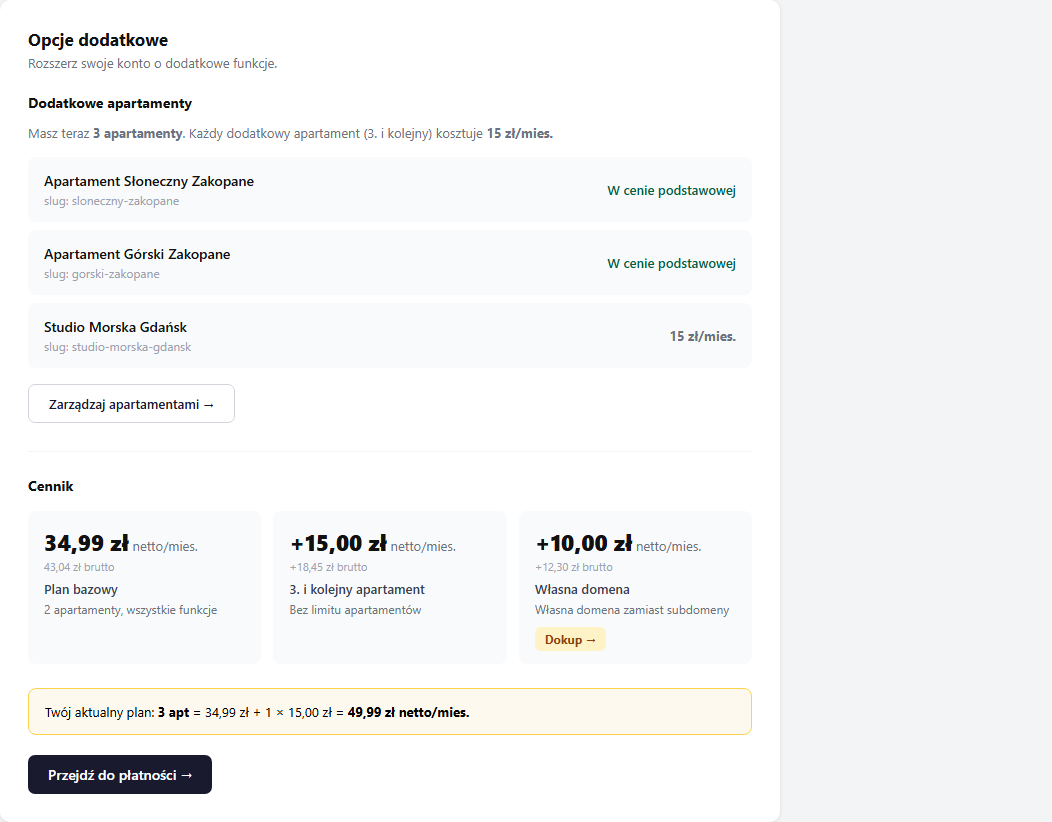
The erphome.pl base plan includes 2 apartments. Each additional one (the 3rd, 4th and so on) costs PLN 15.00 net/mo (PLN 18.45 gross). You can add apartments without limit.
How to check how many slots you have
In My account → Subscription there's an Apartments (used/paid) tile, e.g. 2 / 3: this means 3 paid slots and 2 used, so you still have 1 free slot.
When you reach the limit, the tile changes to "Limit reached" and a yellow "Buy a slot →" button appears.
Where to manage them
Go to My account → Add-ons. There you'll find a list of all apartments with information about which are included in the base price and which are purchased.
How to buy an additional slot
Way 1: through Add-ons: Click "Go to payment →" in the My account → Add-ons section.
Way 2: when the limit is reached: In My account → Subscription, click "Buy a slot →". You'll be taken to checkout with a ready order.
Way 3: when adding an apartment: Go to the Apartments section in the panel menu and click "Add apartment". If the limit is used up, the system redirects you to checkout automatically.
How much you'll pay
The amount depends on whether you already have a paid subscription or you're buying the slot at renewal.
Buying mid-period (pro-rata)
When you have an active subscription and buy a slot during it, you pay pro-rata: only for the time left until the end of the current billing period. The new slot gets the same renewal date as the rest of your subscription, so everything renews together in a single payment. You don't choose a separate 1/3/6/12-month period: the system aligns it to your subscription's end date automatically.
On the proforma you'll see the line "Additional apartments (+N) – subscription extension" with the calculated pro-rata amount (the remaining days of the current month plus any full months up to the end of the period). That's why the first charge for a slot can be lower than the full PLN 15.00. You only top up the missing part.
The minimum payment is PLN 1.00. If only a few days remain in the period and the pro-rata would come out in cents, we round up to this floor, payment gateways reject micro-payments.
Buying at renewal (full period)
When you pay for a slot together with renewing your subscription, you choose the billing period just like with the subscription, 1, 3, 6 or 12 months. Slot price:
| Period | Net price | Gross price |
|---|---|---|
| 1 month | PLN 15.00 | PLN 18.45 |
| 3 months | PLN 45.00 | PLN 55.35 |
| 6 months | PLN 90.00 | PLN 110.70 |
| 12 months | PLN 180.00 | PLN 221.40 |
Discounts for longer periods (5%/10%/20%) apply only to the base plan. Additional apartment slots are not discounted, whichever way you buy them.
How to give up an additional slot
Remove the apartment in the Apartments section in the panel menu. Paid slots remain valid until the end of the current billing period. They aren't refunded automatically.
At the next subscription renewal, don't buy additional slots. Choose a plan with the number of apartments that matches your current needs.
Total price examples
| Configuration | Net/mo | Gross/mo |
|---|---|---|
| 1–2 apartments | PLN 34.99 | PLN 43.04 |
| 3 apartments | PLN 49.99 | PLN 61.49 |
| 4 apartments | PLN 64.99 | PLN 79.94 |
| 5 apartments | PLN 79.99 | PLN 98.39 |
| + custom domain | +PLN 10.00 | +PLN 12.30 |
Frequently asked questions
How much does an additional apartment cost?
The base plan covers 2 apartments. Each additional one (the 3rd, 4th and beyond) is PLN 15.00 net/mo (PLN 18.45 gross), with no limit on the number of properties. You buy a slot for 1, 3, 6 or 12 months.
Do longer-period discounts apply to additional slots?
No. The 5%/10%/20% discounts apply only to the base plan. Additional apartment slots are charged at full price regardless of the chosen period.
How much will I pay when adding an apartment mid-period?
Pro-rata for the time left until the end of the current billing period. The new slot gets the same renewal date as your subscription, so everything renews together in a single payment. The proforma shows the calculated pro-rata amount, and the minimum charge is PLN 1.00.
How do I give up an additional slot?
Remove the apartment in the Apartments section. A paid slot stays valid until the end of the current billing period and isn't refunded automatically. At the next renewal simply don't buy the slot, choosing a plan that matches your current needs.
Related articles: Apartment catalog: home page with multiple properties · How to add another apartment · Subscription plans · Panel users: team access