Payment history shows all subscription transactions linked to your account — both paid and awaiting payment.
This is the history of your payments for the erphome.pl subscription. Guests' payments for specific stays (and deposits) are tracked separately — in the booking details. See: Payments in a booking.
Where to find the history
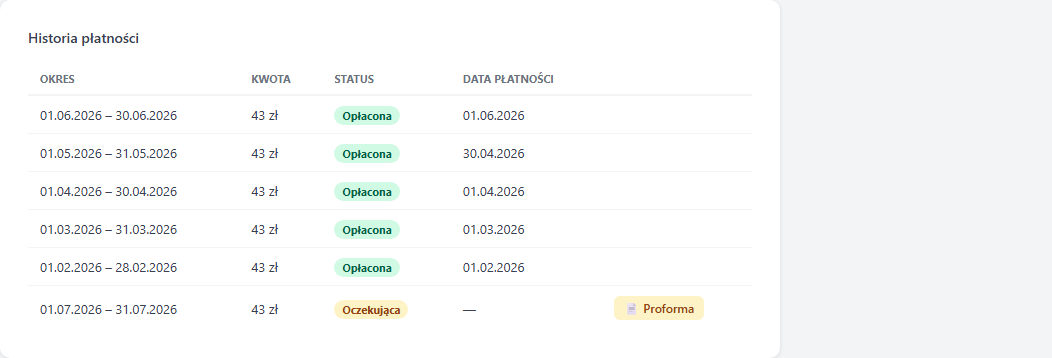
Go to My account → Subscription. The Payment history section is below the renewal form — a table with the latest 6 transactions.
What the table shows
| Column | Description |
|---|---|
| Period | The from–to dates covered by this payment |
| Amount | The total gross amount (PLN) |
| Status | Paid or Pending |
| Payment date | When the transaction was confirmed by the gateway or bank |
| (icons) | For the Pending status: the "Pay online" button and "📄 Proforma" |
Transaction statuses
Paid — the payment was completed and confirmed (by Przelewy24 or after a bank transfer was booked). The account was activated or the period extended.
Pending — the order was placed but the payment hasn't arrived yet. This can happen when:
- You interrupted the payment during the Przelewy24 process
- You chose a bank transfer — it's awaiting booking
- The payment gateway hasn't confirmed the transaction yet (usually a few minutes)
Pay a pending payment online
If a transaction has the Pending status — for example you interrupted the payment halfway, or you chose a transfer but would rather pay faster — click the green "Pay online" button next to that row. You go straight to the Przelewy24 gateway and pay (BLIK, fast transfer, card) without creating a new order.
Once the payment is booked, the status changes to Paid and the subscription is extended automatically — there's nothing to report.
Proforma invoice
A proforma invoice is a document confirming the order before payment — useful for company accounting when payment comes by transfer from a company account.
To download the proforma, click the yellow "📄 Proforma" button next to the chosen transaction with the Pending status. The document opens in the browser and can be printed or saved as a PDF.
The proforma contains:
- Full seller details (ERP HOME SP ZOO, tax ID, address)
- The buyer's details from your profile (fill in your tax ID in Profile details before paying)
- The bank account number and the transfer title
- A fixed issue date and payment due date (3 days) — they don't change when you reopen it
Activation time after a bank transfer
Incoming bank payments are verified 3 times a day after the ELIXIR system sessions (around 11:00, 15:00 and 17:30). The subscription is activated automatically once the payment is booked — there's nothing to report.
VAT invoice (KSeF)
After the payment is confirmed, we issue a VAT invoice through KSeF (the National e-Invoicing System) within 7 business days. The document is sent to the account email.
The proforma stays available until the transaction is paid. Once the payment is booked, the status changes to Paid and the VAT invoice is sent by email. If you need a copy or a correction of an invoice, write to [email protected] with the account email and the billing period.
I can't see my payment
The table shows the latest 6 transactions. If you're looking for an older document or an expected payment is missing, contact support with the account email and the approximate transaction date.
Related articles: How to renew your subscription · Subscription plans and pricing · Profile details (tax ID for invoices) · Payments in a booking (guest payments)