You can renew your subscription at any time — both before it expires and after. erphome.pl doesn't charge automatically — every renewal requires a deliberate decision and a click on "Pay".
How to renew, step by step
- Sign in to the panel and click My account in the menu.
- In the sidebar, click Subscription.
- Check the status tiles — you'll see the current account status, the expiry date and the monthly amount.
- In the Extend subscription section, click one of the period cards: 1 month, 3 months, 6 months or 12 months.
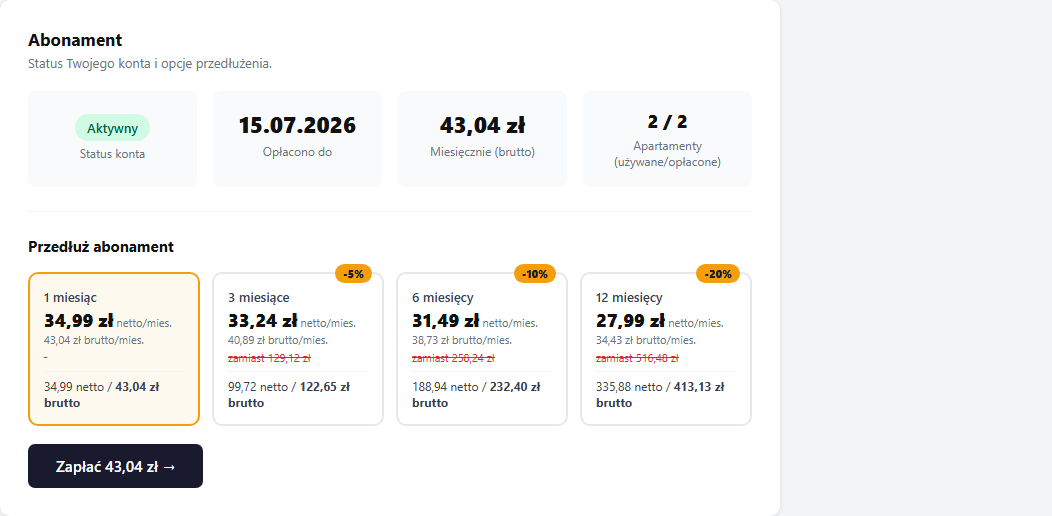
- Below the grid you'll see the amount due — click "Pay PLN X →".
- On the payment page, choose a method: BLIK, online transfer, credit card.
- After the gateway confirms, you return to the panel — the status changes to Active immediately.
Reminders about an expiring subscription
You don't have to track the expiry date in a calendar — erphome.pl reminds you by email. We send automatic reminders to the account owner's email 7, 3 and 1 day before the end of the paid period, and on the last day a message marked "expires today".
- Each threshold is one message — no repeats.
- The email contains the expiry date and an "Renew subscription →" button that leads straight to the Subscription section in the panel.
- When you renew, the remaining reminders for the current period aren't sent — the next period gets its own set of reminders.
- Reminders apply only to accounts with the Active status. Accounts in the trial period get separate welcome messages and an end-of-trial warning.
Reminders go to the owner's email from Profile details. If you're not receiving them, check your spam folder and verify the address in the Changing your password and email section.
Payment by bank transfer (proforma)
If you prefer to pay by transfer from a company account instead of through Przelewy24:
- Go through the renewal process as described above — the system creates an order and saves it as Pending in your payment history.
- In the payment history, click the yellow "📄 Proforma" button next to the new order.
- The proforma contains full transfer details: the ING Bank Śląski account number, the recipient and the transfer title.
- Make the transfer for the given amount with the title from the proforma.
Activation time after a transfer: We check incoming bank payments 3 times a day after the ELIXIR system sessions (around 11:00, 15:00 and 17:30). The subscription is activated automatically once the payment is booked — you don't have to write or confirm anything.
You can also open the proforma via My account → Subscription → Payment history — it's available the whole time you're waiting for the transfer.
VAT invoice (KSeF)
After the payment is confirmed, we issue a VAT invoice through KSeF (the National e-Invoicing System) within 7 business days. The document is sent to the email assigned to the account. If you want an invoice for your company, fill in your tax ID before paying in the Profile details section.
Account statuses
| Status | What it means |
|---|---|
| Trial | 14 days after registration (21 days with a referral link), all features active |
| Active | Paid subscription, page available to guests |
| Suspended | The trial ended or the subscription expired |
| Cancelled | Account manually closed by support |
What happens when the subscription expires
The status changes to Suspended:
- The booking page (
your-name.erphome.pl) stops being visible to guests - New bookings can't be submitted
- Panel access remains — you can sign in, review data and renew
- Your data (bookings, settings, photos) is kept in full — nothing is deleted
After payment the account returns to Active — immediately with an online payment, or once the payment is booked with a bank transfer.
Can I cancel and get a refund?
The subscription is not renewed automatically — there are no recurring charges. You buy the chosen period up front. For refund questions, write to [email protected] — we review them case by case.
Related articles: Subscription plans and pricing · Payment history and invoices · Profile details (tax ID for invoices) · Refer friends — free months