If you already have your own website — a company site, WordPress, Wix or plain HTML — you don't have to give it up. The erphome.pl widget adds a booking box for your apartment to it: the guest picks dates and the number of guests, sees right away whether the date is free, and a button leads them to confirm the booking.
Where to get the widget code
Settings → Calendars → the "🧩 Booking widget for your website" card.
There you'll find two ready-to-copy variants — separately for each apartment (switch the apartment in the top menu if you have several).
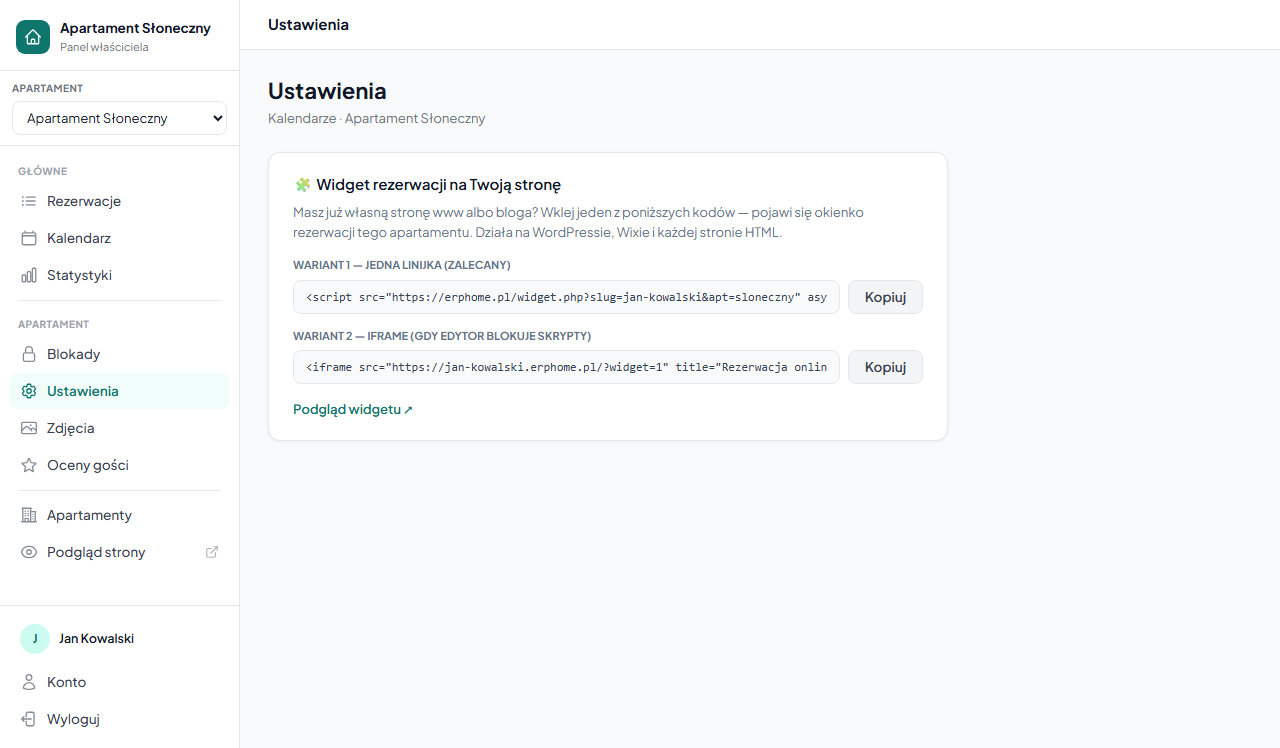
Variant 1 — one line (recommended)
<script src="https://erphome.pl/widget.php?slug=YOUR-SLUG&apt=APARTMENT" async></script>Paste this line where the widget should appear on the page. The script inserts the booking box there itself and will never require updating — all widget improvements happen on our side.
WordPress: add a "Custom HTML" block and paste the line. HTML page: paste it anywhere in .
Variant 2 — iframe (when the editor blocks scripts)
Some site builders (e.g. some Wix plans or company CMS editors) don't allow pasting scripts but do accept frames:
<iframe src="https://YOUR-SLUG.erphome.pl/?widget=1"
        title="Online booking" loading="lazy"
        style="width:100%;max-width:420px;height:430px;border:1px solid #e2e8f0;border-radius:14px"></iframe>
The effect is identical — only the embedding method differs.
How it works for the guest
- In the widget, the guest selects arrival and departure dates and the number of guests.
- The widget immediately checks availability — it knows your bookings, blocks and dates occupied on Booking.com/Airbnb (from iCal synchronization).
- After clicking "Check price and book", the guest lands on your full booking page — with the date already selected, the price calculated and the form ready. There they finish the booking (and any online payment).
The booking always finalizes on your erphome.pl page — so payments and confirmations work exactly the same, no matter where the guest came from.
Tips
- The widget color is inherited from the apartment's accent color (Settings → Apartment → Personalization).
- The widget shows a "from X PLN/night" price — the guest sees the full quote (seasons, discounts, additional fees) after continuing.
- Have several apartments? Embed several widgets — each with a different
apt=parameter. - You can see a widget preview via the "Widget preview ↗" link in the panel before pasting it onto your page.
Related articles: How to check and share your booking page · Page personalization · Custom domain · Language versions of the page · How iCal synchronization works