Your booking page can run in several languages at once. Polish is the default, and on top of that you can offer the page in English, German, Czech, Slovak, Ukrainian, Russian, French, Spanish, Italian and Dutch. The page detects the guest's browser language and switches to a supported version — all you need to do is fill in the translation.
How language detection works
The system checks the guest's preferences in this order:
- URL parameter (
?lang=en,?lang=de,?lang=pl…) — if the guest clicks the language switcher on the page, the preference is saved in the session. - Browser session — a remembered choice from a previous visit.
- Accept-Language header — automatic detection based on browser settings (e.g. a German phone → the page loads in German, if you've enabled German).
If the guest's browser reports a language you haven't enabled, the page displays in Polish. The language switcher in the navigation only shows the versions you've actually published — the guest can always change the language manually.
Where to configure language versions
Settings → Apartment → the "Language versions" card (marked with the 🌐 icon).
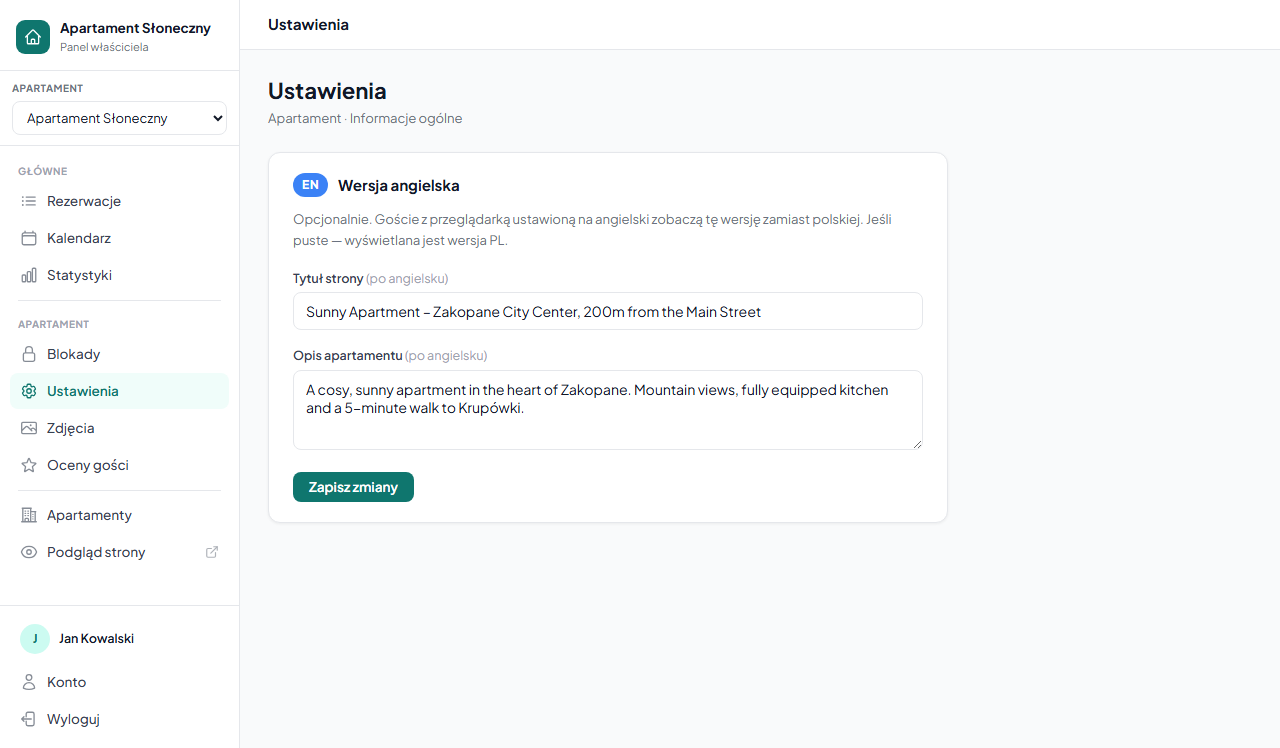
Step 1 — select languages
In the "Available languages" field, click the languages you want to offer. Polish is always selected as the default. When you enable a language, a block of translation fields for that language appears below.
Step 2 — fill in the translations
For each enabled language you translate four fields:
- Page title — the equivalent of the apartment title. Appears as the H1 heading and the browser tab title.
- Apartment description — the text shown in the main section of the page.
- House rules — one rule per line.
- Nearby — what's close to the apartment, one item per line.
Example: if the Polish title is "Apartament Słoneczny – Zakopane Centrum", the English one could be "Sunny Apartment – Zakopane City Center, 200 m from the Main Street".
All fields are optional. An empty field = fallback to Polish — a guest in that language will see the Polish content in that spot. Better to have even a short description in a foreign language than none.
Step 3 — save
Click "💾 Save apartment settings" — the language versions are saved together with the rest of the Apartment card.
Amenities translate automatically
You don't have to translate the amenities list by hand. For the English version, the system automatically translates the selected amenities into English using a built-in dictionary (90+ entries across Internet & TV, Kitchen, Bathroom, Equipment, Parking, Sports & recreation, and Other). Amenities not in the dictionary keep their original wording.
In the other languages, amenities are shown in their Polish version — translate them in the name itself if you want a fully foreign-language set.
See how the page looks
After saving, open your booking page and add the ?lang= parameter with a language code, e.g.:
your-name.erphome.pl?lang=en
your-name.erphome.pl?lang=de
You'll see the page as a guest in that language would. Switch back to Polish via ?lang=pl or click the language switcher in the navigation.
Language codes:
enEnglish,deGerman,csCzech,skSlovak,ukUkrainian,ruRussian,frFrench,esSpanish,itItalian,nlDutch.
Related articles: Basic information (title, description, address) · Apartment amenities · House rules · Personalization — color and emoji · Booking widget on your website · Custom domain — DNS configuration