You can reply publicly to any published review: the reply appears under the review on your booking page as a "Host reply". The page also automatically shows a rating summary: the average and the star distribution.
How to reply to a review
- Sign in to the panel and go to the Guest reviews section
- In the Published section, find the review you want to reply to
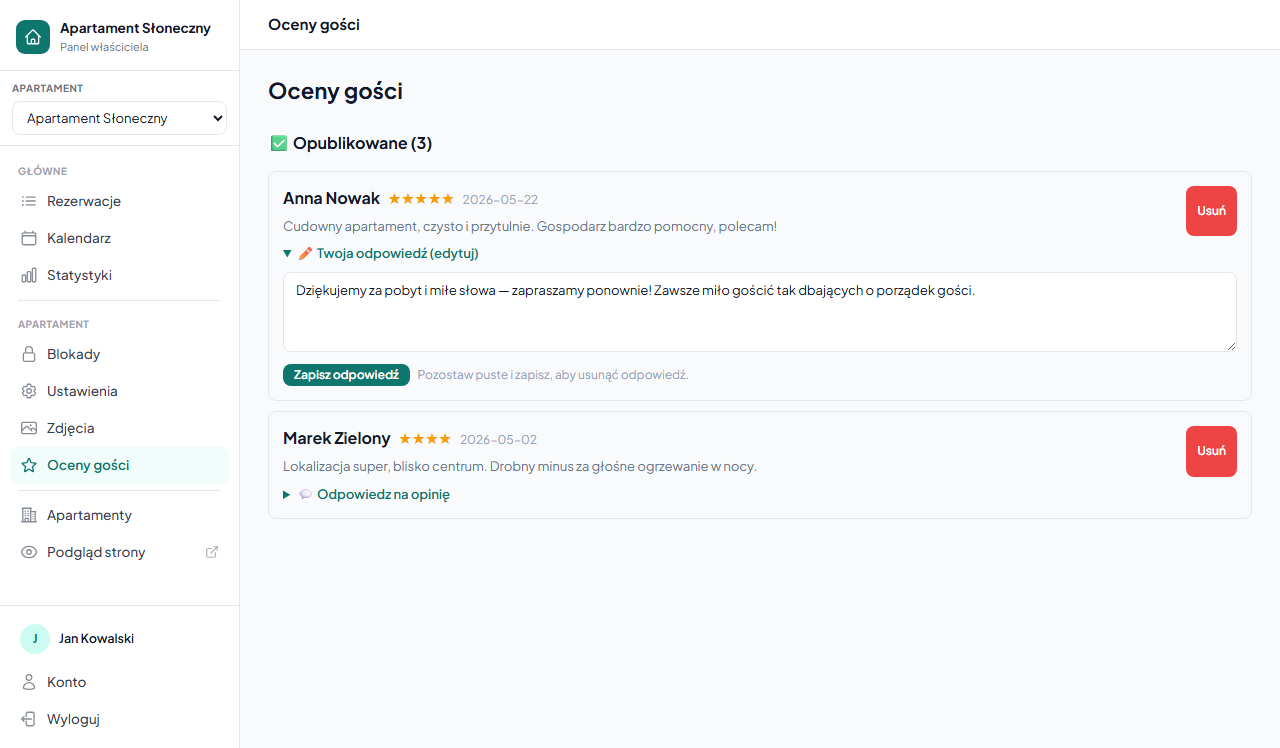
- Click "💬 Reply to the review" under the review content: a text field expands
- Enter your reply (max 1000 characters) and click "Save reply"
The reply is visible on the booking page right after saving: without additional moderation.
You can only reply to published reviews. A review awaiting approval has no reply option: first approve it according to review moderation.
Editing and deleting a reply
For a review with a saved reply, instead of "Reply to the review" you'll see "✏️ Your reply (edit)": the section is expanded by default.
- Editing: change the text in the field and click "Save reply"; the new version replaces the previous one
- Deleting: clear the field (leave it empty) and click "Save reply"; the reply disappears from the page
How the reply looks to the guest
Under the review content on the booking page, a highlighted block appears with the Host reply label and your text. The reply is signed by role, not by name: guests see that the property owner is writing.
Average rating and star distribution
The reviews section on the booking page contains an automatic summary of all published reviews:
- Average rating: a large number (e.g. 4.8) with stars and the number of reviews
- Star distribution: bars showing how many reviews have 5★, 4★, 3★, 2★ and 1★
The summary updates itself with each approval or deletion of a review: no configuration required. If you delete all reviews, the whole section disappears from the page.
How to reply: a few tips
- To positive reviews: briefly thank the guest and invite them back. Two sentences are enough.
- To critical reviews: address the specific point, without justifying yourself point by point. A factual reply to a 3-star review builds future guests' trust more than the five-star alone.
- Don't publish guest data: the booking number, email address or payment details. The reply is public.
Frequently asked questions
Is my reply to a review moderated?
No. The host reply appears on the booking page right after you click "Save reply", with no extra verification. Only the guest's review itself goes through moderation.
Can I reply to a review awaiting approval?
No. You can only reply to published reviews. A pending review has no reply option: first approve it in review moderation.
How do I delete a reply I added earlier?
Open the "✏️ Your reply (edit)" field, clear its text and click "Save reply" with the field empty. The reply disappears from the booking page.
Related articles: How reviews work: collecting them after the stay · Moderating reviews · Booking page personalization