Your booking page is available immediately after you finish onboarding — with no extra steps. On it, guests can see the apartment description, photo gallery, availability calendar and the booking form.
What the booking page looks like
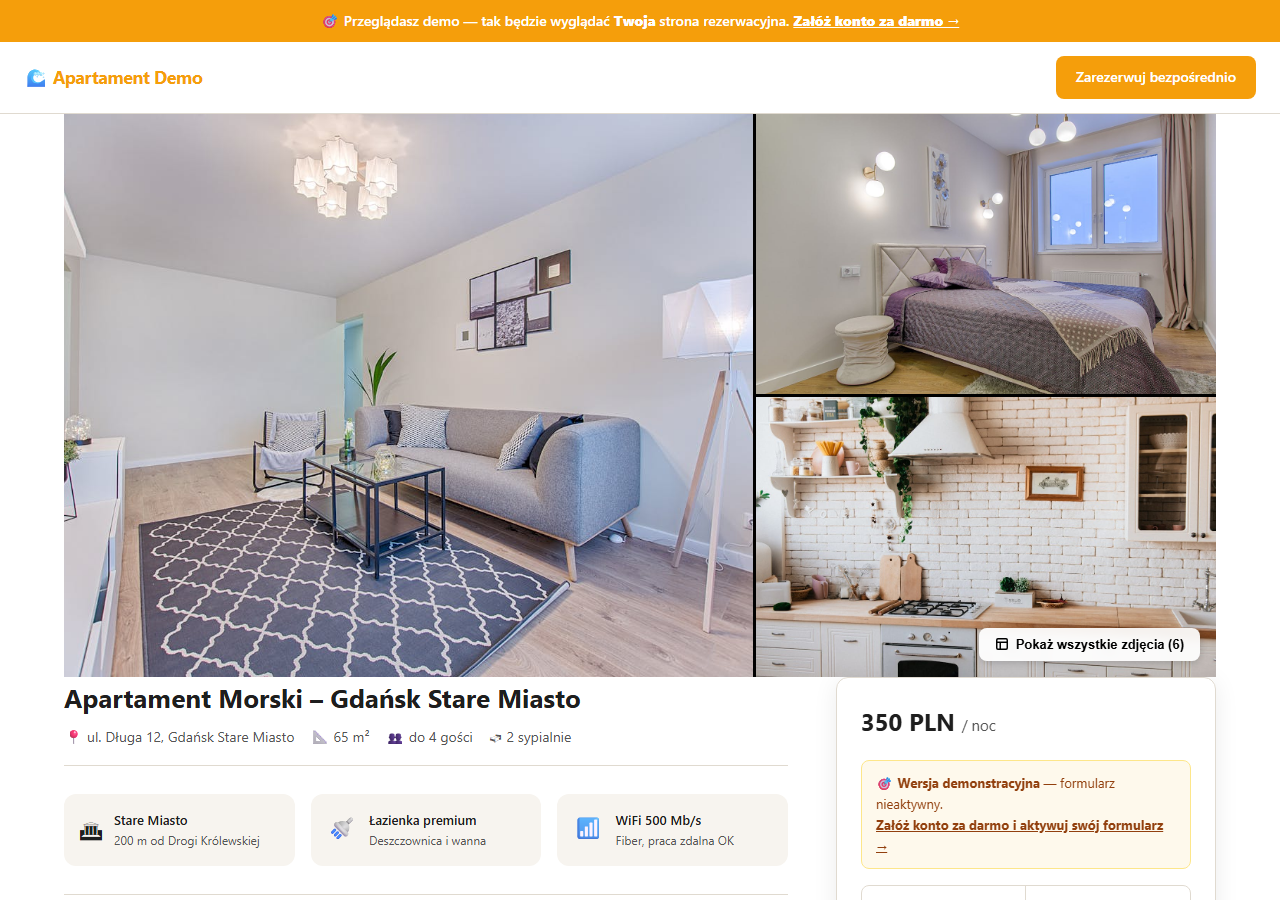
The page contains:
- A photo gallery with a lightbox
- The title, description and key parameters (m², number of bedrooms, guests, check-in hours)
- The price per night and a date-selection form
- An availability calendar
- A list of amenities and house rules
- An FAQ section and guest reviews
- A booking form plus a contact form for pre-booking questions
Where to find your page address
Your page URL is always: https://your-name.erphome.pl, where your-name is the identifier you chose during registration.
The quickest way to open the page — click the "Preview page ↗" link in the panel's left menu. The link opens in a new tab and shows the page exactly as a guest sees it.
Tip: You'll also see the page address in My account → Custom domain — there you can also connect a custom domain instead of the erphome.pl subdomain.
How to check the page before sharing
Before you send the link to guests, review the page as a guest would:
- Click "Preview page ↗" in the panel.
- Check that the title and description are correct — if not, edit them in Basic information.
- Make sure photos are uploaded and displayed in the right order (the Photos section in the panel).
- Check that the availability calendar is up to date — if you have iCal from Booking.com or Airbnb, run a manual sync.
- Test the booking form — select free dates and click "Check availability" to make sure the form works correctly.
How to share the page with guests
When you're ready, copy the URL and share it:
- Direct link — send the URL via SMS, Messenger, WhatsApp or email.
- On your own website — add a "Book directly" button leading to your erphome.pl page.
- In your Booking.com or Airbnb profile — add the URL in the description section or in replies to guest questions.
- QR code — generate a QR code from the URL and print it in the apartment or on a business card.
- Google Business Profile — add the booking page URL as the website in your local profile.
Custom domain (optional)
Instead of your-name.erphome.pl you can use your own domain, e.g. mountain-apartment.com. Configuration takes a few minutes and requires access to your domain's DNS panel.
Details are in the article Custom domain — step-by-step DNS configuration.
Multiple apartments — catalog page
If you have 2 or more apartments, your home page (your-name.erphome.pl) automatically becomes a catalog with a list of properties and a free-date search. Each apartment then has its own URL: your-name.erphome.pl/apartment-slug. Details: Apartment catalog.
Visibility in Google
Your booking page is indexed by Google automatically — you don't need to do anything. We have an integrated sitemap (sitemap.xml) and meta tags for social media sharing.
To speed up indexing, you can submit the page address in Google Search Console.
The booking page has built-in schema.org markup (LodgingBusiness) that helps Google show a rich snippet with the price, location and rating in search results.
Related articles: Custom domain — DNS configuration · Apartment catalog · Basic information for the booking page · Photos and gallery