iCal synchronization in erphome.pl runs automatically every hour. You can also trigger it manually at any time, e.g. right after confirming a direct booking, to block the dates in OTAs as quickly as possible.
Sync status
The import section in Settings → Calendars shows:
- The date and time of the last sync
- The number of fetched dates (occupied days from OTAs)
- The status of each feed: ✓ OK or ❌ error
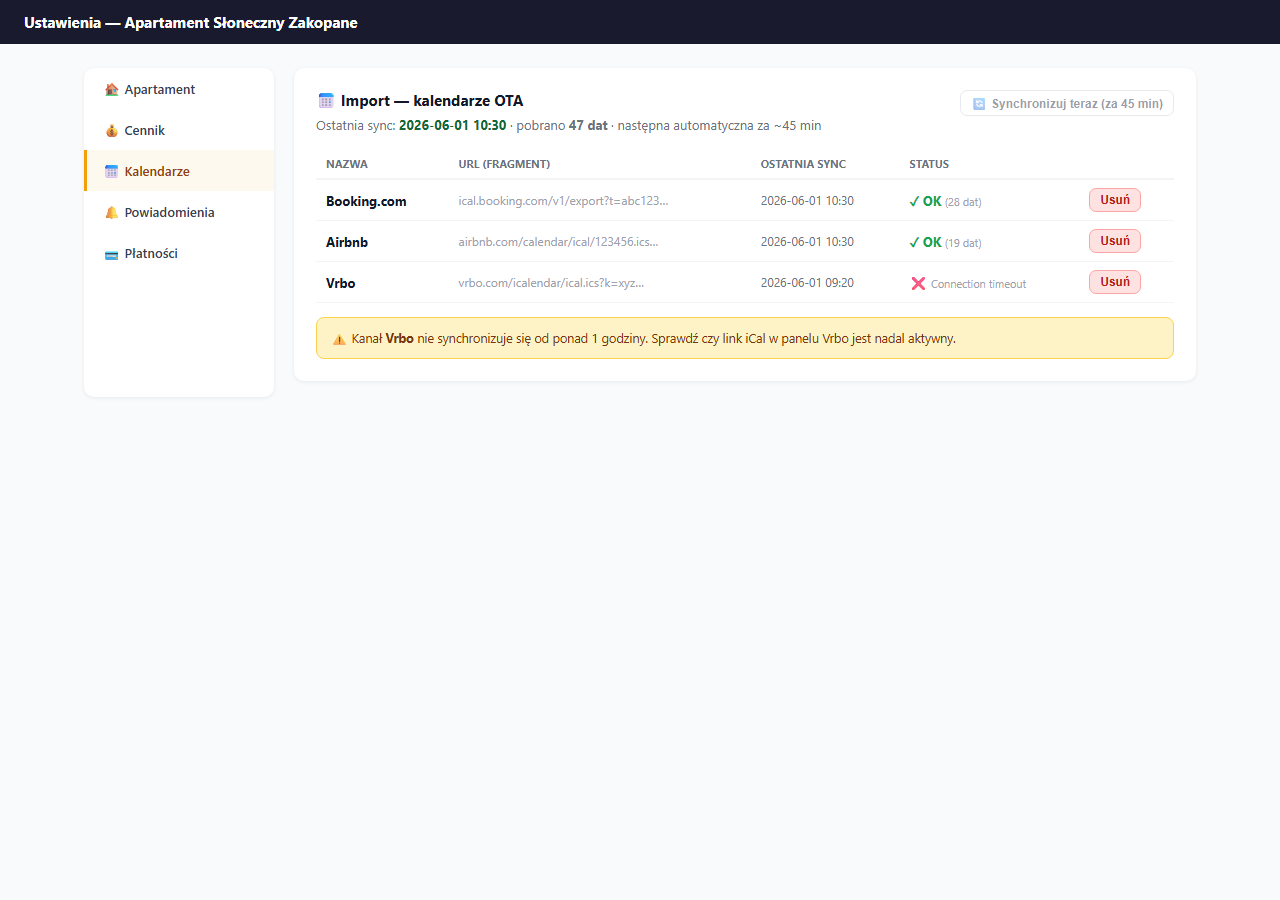
Automatic sync (hourly)
A cron job runs every hour and fetches all added iCal feeds for all active apartments. It works without your involvement, as long as the feeds are correctly added and accessible.
Limit: erphome.pl doesn't allow a manual sync more often than once per hour, the "Sync now" button is disabled if less than 60 minutes have passed since the last sync.
Manual sync
Click "🔄 Sync now" in the import section. The sync runs on all feeds at once and takes a few seconds.
When to sync manually:
- Right after confirming a direct booking, to update the OTA as quickly as possible.
- When you've just returned from vacation and want to check the current calendar state.
- After adding a new iCal feed, the first automatic sync may take a few minutes.
- When you suspect a discrepancy between your calendar and an OTA.
What to do when a feed reports an error
In the feeds table, a shortened error message appears next to the ❌ status. Common causes:
| Error | Cause | Solution |
|---|---|---|
Connection timeout | OTA server unavailable | Wait and try again; check that the link is active |
Invalid URL | Incorrect URL format | Delete the feed, copy a fresh link from the OTA and add it again |
403 Forbidden | Link expired or token changed | Generate a new iCal link in the OTA panel and update it |
Not a valid iCal file | The URL doesn't return an iCal file | Check that the link leads to a .ics, not an HTML page |
If the error persists across several syncs, delete the feed and add it again with a new link.
Delays and the risk of double bookings
| Stage | Time |
|---|---|
| Import: erphome.pl ← OTA | Up to 1 hour (cron) |
| Export: OTA ← erphome.pl | Up to 6 hours (depends on the OTA) |
| Double-booking risk | Within this time window |
In the delay window there's a theoretical risk that the same date gets booked in two places at once. To minimize it:
- After each direct booking, sync manually in erphome.pl.
- On Booking.com and Airbnb you can also manually refresh the external calendar.
- Consider setting a minimum booking lead time (e.g. 1–2 days), it gives time for syncing.
How many iCal feeds can I add
There's no limit on the number of feeds. You can have Booking.com, Airbnb, Vrbo, Tripadvisor and others at the same time. Each feed syncs independently.
A single iCal URL can be connected to only one apartment in erphome.pl. If you try to add the same URL to a second apartment, the system shows an error.
Frequently asked questions
How often does iCal sync automatically?
The automatic import sync runs hourly (cron). You can trigger a manual sync with the "Sync now" button, but no more than once every 60 minutes, the button is disabled until then.
What do I do when an iCal feed shows a 403 Forbidden error?
It usually means the link expired or the OTA-side token changed. Generate a new iCal link in the Booking.com or Airbnb panel, delete the old feed in erphome.pl and add the fresh one. If the error persists across several syncs, re-add the feed from scratch.
How many iCal feeds can I add?
There's no limit, you can have Booking.com, Airbnb, Vrbo, Tripadvisor and others at once, each syncing independently. However, a single iCal URL can be connected to only one apartment; trying to add it to a second one shows an error.
Related articles: How iCal synchronization works · iCal from Booking.com · iCal from Airbnb · iCal export · Minimum booking lead time · Google Calendar: automatic booking events