The erphome.pl API is a REST interface for pulling your account's reservations, occupied dates, pricing, reviews and statistics, and for adding a manual reservation, mailing a guest and generating a payment link. Responses come back as JSON. It is for people who want to connect erphome.pl with their own spreadsheet, accounting system, report or automation tool.
The API is included in every subscription. There is nothing extra to buy, you just issue a token.
What you can do through the API
| Resource | Read | Write |
|---|---|---|
| Apartments (list and identifiers) | yes | no |
| Reservations | yes | add a reservation |
| Availability and calendar | yes | no |
| Date blocks | yes | no |
| Pricing, minimum stays and fees | yes | no |
| Guest reviews | yes | no |
| Statistics (occupancy and revenue) | yes | no |
| Guest messages | yes | send an email |
| Payments | no | generate a link (Przelewy24) |
The base address is https://api.erphome.pl/v1, and the full technical documentation describing every endpoint is at api.erphome.pl/docs (OpenAPI 3.1 standard).
Who can create tokens
Only the account owner can create API tokens. Panel users added to the account do not see this section, even with full permissions. A token grants access to the whole account's data, so it stays in the owner's hands.
How to issue a token
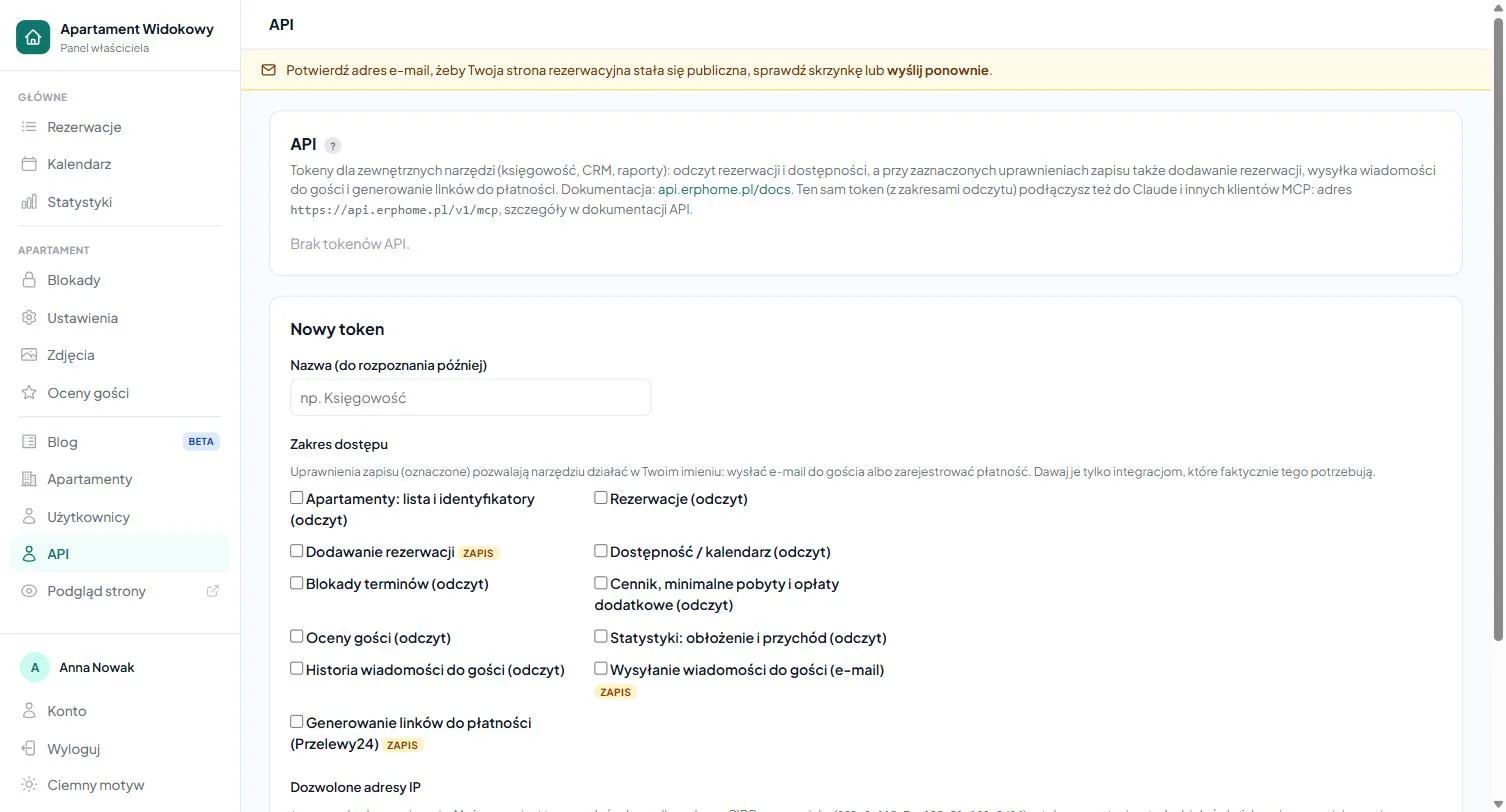
- In the panel, go to the API tab.
- Click "New token" and give it a name (e.g. "Revenue spreadsheet" or "Make.com"), you will recognize what it is for by the name.
- Select the scopes the token should cover. Read (
:read) and write (:write) are separate permissions: a reporting integration then gets a token that physically cannot change anything. - Optionally restrict the token to selected IP addresses (see below).
- Save: the token is shown only once. Copy it immediately and store it somewhere safe; it starts with
erph_live_.
You see the full token exactly once, at creation. If you lose it, it cannot be read again: revoke the old one and issue a new one.
Restricting to IP addresses
For each token you can provide a list of allowed IP addresses or ranges (CIDR, IPv4 and IPv6). By default a token works from any address. The restriction is a second layer alongside the secret itself: a stolen token stops working outside your integration's network. Above the field we show the address you are currently using, so you don't lock yourself out with a typo.
Revoking a token
Revoke a token you no longer use, or that may have leaked, with the button next to its name. It stops working immediately. You can also change just the IP list at any time without issuing a new token.
No-code automation (Make, Zapier, n8n)
You don't have to write your own program. Paste the Bearer token into popular automation tools, Make.com, Zapier or n8n, and build flows like "on a new reservation, add a row to a spreadsheet" without code. To confirm and label the connection in such a tool, use the GET /me endpoint (account identity), which works with any valid token regardless of scopes.
Want to connect an AI assistant such as Claude or ChatGPT? See MCP server: Claude and ChatGPT. It uses the same tokens and scopes, but with no code to write.
Frequently asked questions
Does the API cost extra?
No. The API is included in every subscription, there's nothing extra to buy, you just issue a token in the API tab.
Who can create API tokens?
Only the account owner. Panel users don't see this section even with full permissions, because a token grants access to the whole account's data.
I lost my token. How do I recover it?
You can't. The full token is shown only once, at creation. If you lose it, revoke the old one with the button next to its name and issue a new one. For safety you can restrict a token by scopes and IP addresses.
Related articles: MCP server: Claude and ChatGPT · Subscription plans · Panel users · Statistics · Exporting reservations to CSV