No review reaches the public page without your consent. Each review goes through moderation — first you see it, and only after clicking "Approve and publish" does it become visible.
Where to manage reviews
Sign in to the panel and click Guest reviews in the left menu. The page is split into two sections.
Section: Awaiting approval
All new reviews land here — not yet public, visible only to you.
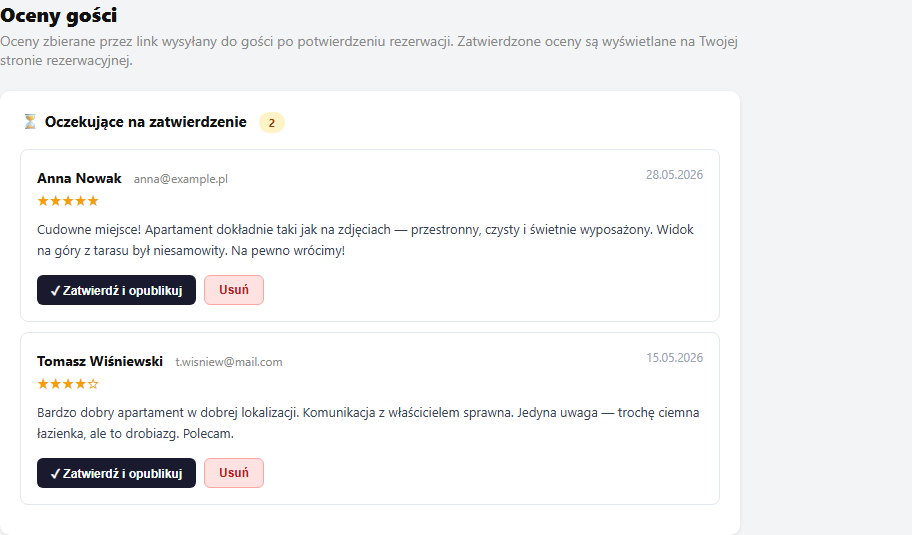
For each review you see:
- The guest's name and email address
- The number of stars (1–5)
- The review content
- The submission date
Available actions:
"✓ Approve and publish" — the review moves to the Published section. From now on it's visible to visitors of your booking page.
"Delete" — the review is permanently deleted. A confirmation dialog appears. The operation can't be undone.
Section: Published
Here you see all approved reviews. They're automatically shown on your booking page — along with the average rating and star distribution. No configuration is required.
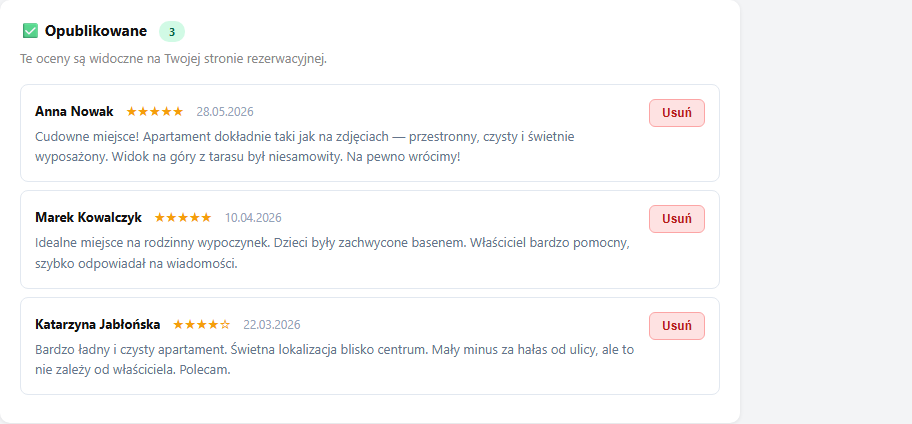
For each published review, two actions are available:
"💬 Reply to the review" — you can reply publicly to the review; the reply appears under the rating on the page as "Host reply". Details: Replying to reviews.
"Delete" — you can delete a review at any time (the button on the right of the review). A confirmation dialog appears — once confirmed, the review disappears and is no longer shown on the page.
Which reviews to approve, which to reject
Approve a review when it's authentic — even if it contains criticism. Reviews with a mixed rating (e.g. 3–4 stars with a constructive comment) build credibility more than exclusively 5-star reviews.
Delete a review when:
- It contains vulgar or offensive content
- It's clearly spam or doesn't concern your apartment
- It comes from someone who wasn't your guest (e.g. a wrong token)
You can't edit a review's content — you can only approve it or delete it entirely.
No pending reviews — why
If the pending section is empty but you expected new reviews, possible causes:
- The guest hasn't clicked the link in the email yet
- The booking has a status other than Confirmed — the link works only for confirmed bookings
- The link was already used (
review_done=1)
The review token is attached to the confirmation email (more: How reviews work). If you want to check whether the guest received the link, look at the event history in the Bookings → details section.
Related articles: How reviews work — collecting them after the stay · Replying to reviews and the rating summary · How the booking process works · Message to the guest