A deposit (refundable) is an amount collected from the guest at check-in and returned after departure, when the apartment is in undamaged condition. The panel tracks the full deposit lifecycle — from awaiting payment to refund or retention.
Where to set the default amount
Settings → Pricing → the "Deposit" card → the "Deposit amount (PLN)" field.
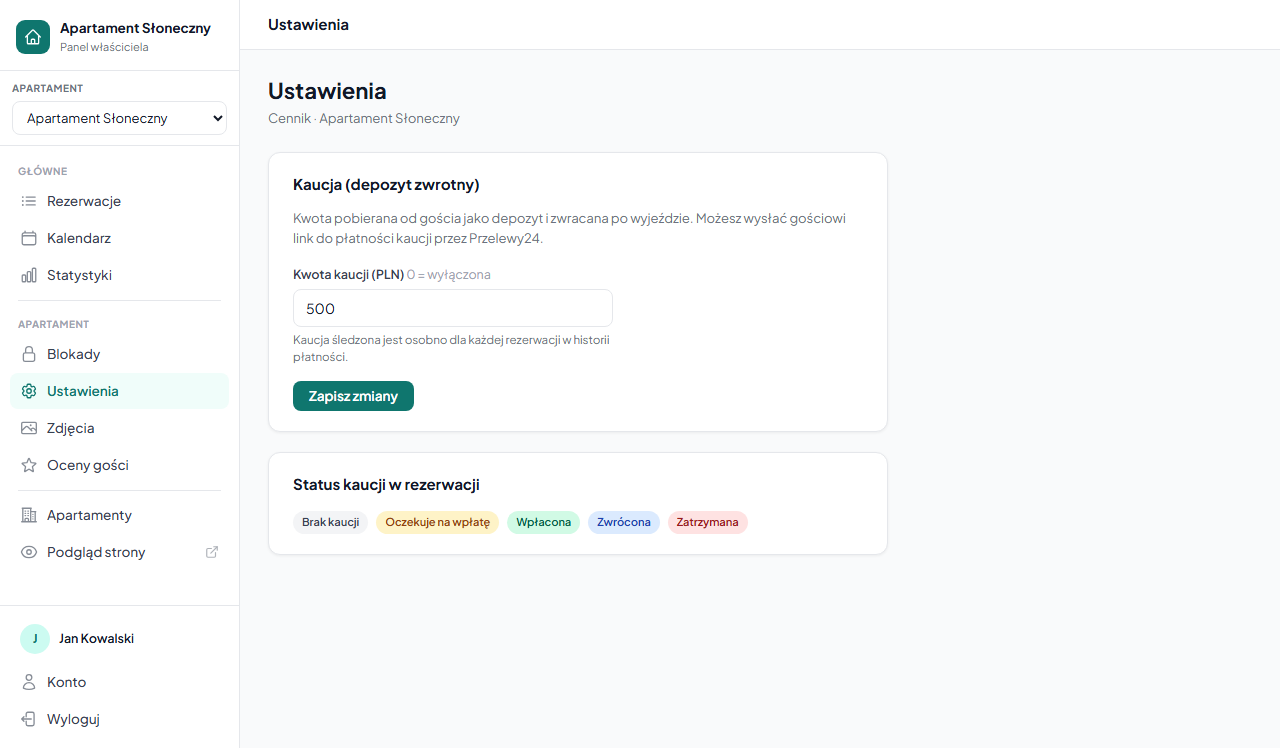
Enter the amount in PLN. Entering 0 disables the deposit for this apartment — new bookings won't track it.
The amount is a default — you can change it for each booking individually (or when creating a booking manually).
Deposit status in a booking
In each booking's details (Bookings → click a booking) there's a "Deposit" section with the status and action buttons.
Possible statuses
| Status | Meaning |
|---|---|
| No deposit (gray) | Deposit amount = 0, no deposit collected |
| Awaiting payment (yellow) | Deposit set, the guest hasn't paid yet |
| Paid (green) | The guest has paid the deposit — apartment booked |
| Returned (blue) | Deposit returned to the guest after departure |
| Retained (red) | Deposit retained (damage, rule violation) |
Available actions
When status = Awaiting payment:
- "✓ Mark as paid" — manual marking (when the guest pays in cash or by transfer).
- "🔗 Send deposit payment link" — generates a P24 online payment link (requires a configured gateway and the guest's email). Copy the link and send it to the guest.
When status = Paid:
- "↩ Mark as returned" — after departure and inspection of the apartment.
- "✗ Retain deposit" — when the guest caused damage. Enter the reason in the note field.
Changing the deposit amount in an existing booking
In the "Deposit" section you can also change the amount for a specific booking: enter a new value in the field and click "Set amount".
- Setting > 0 when the deposit is "None" → the status automatically changes to Awaiting payment.
- Setting it to 0 → the status returns to No deposit.
Deposit payment history
All deposit-related events are recorded in the booking's "Payment history" section — alongside payments for the stay itself. Each entry includes the amount, type (Deposit), status and a note. How the whole section works: Payments in a booking.
Manual booking and the deposit
When you create a booking manually, the deposit field is pre-filled by default with the amount from the apartment settings — you can change it or zero it out before saving.
Deposit payment link via P24
The payment link is independent of the booking payment link. The guest can pay for the booking and the deposit separately. You can generate a deposit link both for bookings submitted via the form and for manually added ones.
A payment link generated by P24 is valid for 24 hours. If the guest doesn't pay in time — generate a new link.
Related articles: Payments in a booking — payment history · Additional fees · Manual booking by the owner · Online payments — Przelewy24 configuration · Editing a booking