The review system in erphome.pl works fully automatically — the guest gets a one-time link to the form, fills it in after the stay, and you approve the review before publication.
How the guest gets the review link
The guest can receive the review link in two ways:
1. The booking confirmation email — a one-time link is created when the booking is submitted and attached to the confirmation email the guest receives after you confirm.
2. The post-departure email — the system automatically sends the guest a separate email asking for a review 2 days after the check-out date. It contains the same one-time link. A daily job running in the morning handles delivery, so the email arrives on the second day after check-out — while the stay is still fresh in the guest's mind.
The link looks like this:
https://erphome.pl/www/ocena.php?t=a3f9c2b1...
The token in the link is unique to each booking and works exactly once — after a review is submitted it expires and can't be used again.
The review form — what the guest sees
After clicking the link, the guest lands on a simple page with a form.
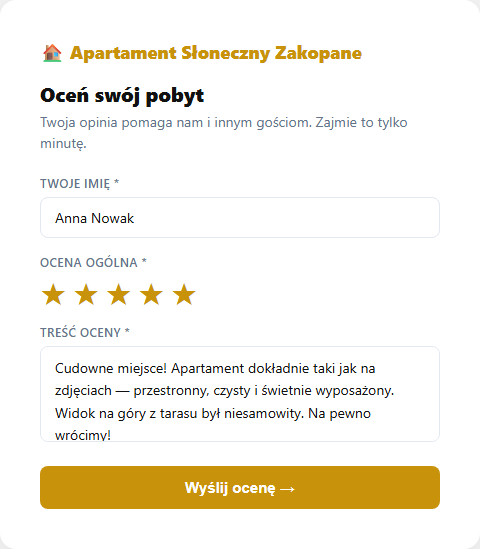
The form has three fields:
- Your name — pre-filled with the name from the booking; the guest can change it
- Overall rating — 1–5 stars (required)
- Review content — at least 10 characters (required)
After submitting the form, the guest sees the message:
⭐ Thank you for your review! Your review will be published after verification.
What happens after a review is submitted
- The review goes into the database with the
approved=0flag — it's not public yet - It appears in the owner panel in the Guest reviews section as "Awaiting approval"
- The booking token is marked as used (
review_done=1) — the link stops working - The owner approves or deletes the review (described in Moderating reviews)
- An approved review immediately appears on the booking page — along with the average rating and star distribution; the owner can also reply publicly
When the token expires
The token is single-use — it stops working after the first successful form submission. If the guest opens the link again (or someone else tries to use the same link), they'll see the message:
"The link is invalid or a review has already been submitted."
The token also works only for bookings with the Confirmed status — a guest with a pending or cancelled booking can't submit a review.
What the guest rates — the whole stay, not the apartment
There's one form per booking, not per apartment. The guest rates their stay experience, so the quality of the response depends on, among others:
- Whether the apartment matched the description
- Whether communication before and after arrival was smooth
- Whether the check-in instructions were clear
Fill in the Check-in instructions and ensure quick replies to guest messages — it translates directly into higher ratings.
Related articles: Moderating reviews · Replying to reviews and the rating summary · Which emails the guest receives · Check-in instructions · Message to the guest