Right after you add an apartment, its booking page is still empty. The profile-completion bar walks you through everything worth setting up before you show the page to guests — without hunting through several screens at once.
Where to find the bar
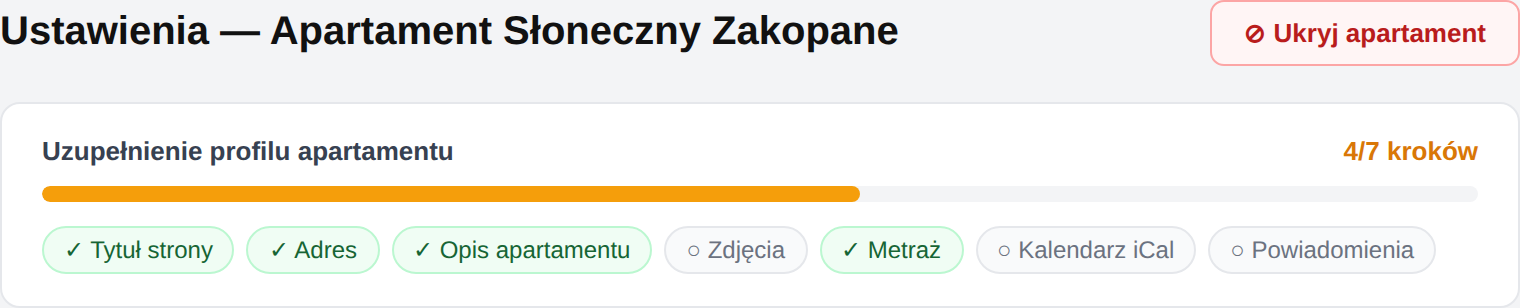
The bar appears at the top of the Settings screen — separately for each apartment. It shows a counter of completed steps (e.g. 4/7 steps) and a colored progress bar:
- 🔴 red — below 50% (the profile is just starting),
- 🟠 amber — 50–79% (almost there),
- 🟢 green — 80% and above (the profile is nearly ready).
Once you complete all 7 steps, the bar disappears — a sign that the profile is complete.
Right after adding an apartment you'll also see a green "🎉 Apartment added!" banner — an invitation to start filling in the profile straight away.
The 7 profile steps
Each step is a clickable chip under the bar. Green with ✓ means the step is done, gray with ○ means it's still to do. Clicking takes you straight to the right field or screen.
| Step | Where to set it | When it counts as done |
|---|---|---|
| Page title | Settings → Apartment | The title field is filled in |
| Address | Settings → Apartment | The apartment address is entered |
| Description | Settings → Apartment | The description has at least a few sentences |
| Photos | Photos (side menu) | At least one photo is uploaded |
| Size (m²) | Settings → Apartment | The floor area in m² is given |
| iCal calendar | Settings → Calendars | At least one iCal feed is connected |
| Notifications | Settings → Notifications | Telegram is connected |
Why it's worth finishing every step
- Title, description and photos shape the first impression — that's what the guest sees before deciding to book. Details: Basic information and Photos and gallery.
- Address and size build trust and help the guest judge whether the place fits their needs.
- iCal calendar protects against double bookings — it links erphome.pl with Booking.com and Airbnb. See How iCal sync works.
- Notifications mean you learn about every new inquiry immediately — without checking the panel. See How to connect Telegram.
The "Notifications" step and email
The bar marks the Notifications step done only after Telegram is connected. Email notifications work independently and you can enable them at any time — even if you don't use Telegram, set an address in Email notifications so you never miss a booking.
Do you have to complete the profile to take bookings?
No — an apartment can take bookings even with an incomplete profile. The bar is a hint, not a lock. Still, it's worth reaching 100% before sharing the page with guests: a complete profile looks professional and converts better.
Price is a separate tip — the bar doesn't count it, but without a base price the page won't show the guest a stay total. Set up pricing along with the rest of the profile.
Related articles: How to add another apartment · Panel overview · Basic information · Photos and gallery · How to check and share your page