Every time a guest submits a booking request, erphome.pl sends you an email with the guest's details, the dates and the price calculation. By default it goes to the email address provided during registration.
Where to configure it
Go to Settings → Notifications (a tab in the apartment settings' left menu). The Email section is at the bottom of the page, below the Telegram section.
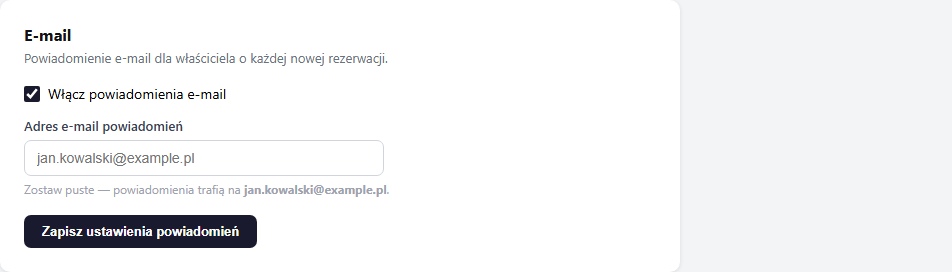
How to change the recipient address
By default, notifications go to the account owner's address (the one from registration). If you want notifications to go to a different address:
- Tick the "Enable email notifications" checkbox (if it isn't checked).
- In the Notification email address field, enter the target address.
- Click "Save notification settings" at the bottom of the section.
Leave the address field empty to revert notifications to the account owner's address.
Possible uses:
- Forwarding notifications to a support office or property manager
- A separate booking address, independent of the account
- Notifications to several people — set a group mailbox (alias) address
What the email notification contains
The owner notification email contains:
- The guest's full name
- Email address and phone (if provided)
- The dates (check-in and check-out)
- The number of guests
- A price calculation broken down into components (accommodation, surcharges, discounts, promo code)
- The guest's message (if entered)
- An "Open panel →" button to manage the booking
How to disable email notifications
Uncheck the "Enable email notifications" checkbox and save. Telegram and other channels stay unchanged. Email notifications to guests (request confirmation, booking status) are sent independently — you can't disable them.
Settings are per apartment
If you have more than one apartment, each has separate notification settings. Switch the active apartment with the button in the top panel menu, then configure the settings separately for each.
Related articles: How to connect your account to Telegram · Google Calendar — automatically adding bookings · Which emails the guest receives · Messages from a guest (contact form)