Telegram notifications are the fastest way to learn about a new booking — the message reaches your phone within seconds of the guest submitting a request. Setup takes about 2 minutes.
Requirements
- The Telegram app on your phone or computer (Android, iOS, Windows, Mac, web)
- Access to the erphome.pl owner panel
Step 1 — Open the notification settings
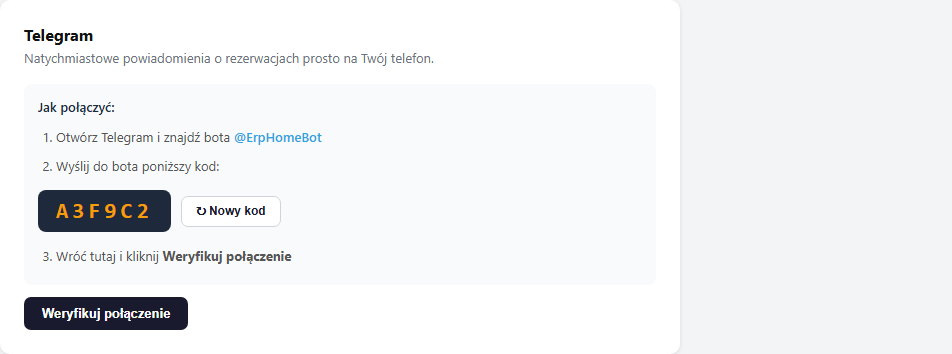
Sign in to the panel and go to Settings → Notifications (the Notifications tab in the left menu). In the Telegram section you'll see a one-time connection code.
Step 2 — Send the code to the @ErpHomeBot bot
Open Telegram and search for the @ErpHomeBot bot (or click the link t.me/ErpHomeBot). Click Start or Send message and type the code shown in the panel — e.g. A3F9C2.
The code is unique to each apartment and single-use. Send it exactly as it appears in the panel — in uppercase, with no spaces. The bot will confirm receipt with a message.
Step 3 — Click "Verify connection"
Go back to the panel and click the "Verify connection" button. The system checks the messages sent to the bot and pairs your chat ID with the apartment.
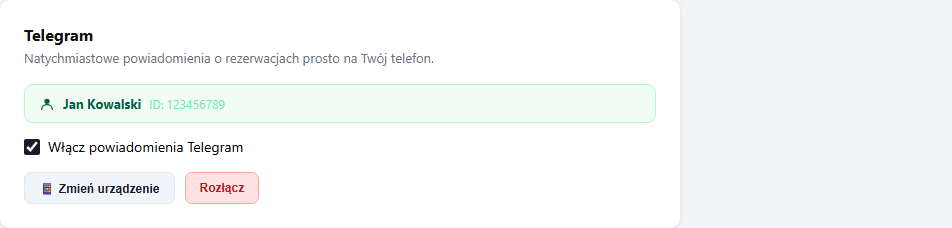
After a successful connection you'll see a green message "Telegram connected! Notifications will go to this chat." and the username or name in the Telegram section.
The bot will also send you a welcome message: "✅ Connected to erphome.pl! You'll receive notifications…"
What a Telegram notification contains
With each new booking request you'll get a message in the format:
🏠 New request #42 — Sunny Apartment Zakopane
👤 Anna Nowak
📧 [email protected]
📞 +48 600 000 111
📅 2026-07-15 → 2026-07-20 (5 nights)
👥 3 guests

💰 Price calculation:
  Summer (5n × 400 = 2000 PLN)
  Extra-guest surcharge (3 people): 150 PLN
  ─────────────
  Total: 2150 PLN
How to change the device or chat
If you want to receive notifications on a different chat (e.g. a group chat or another phone), click "📱 Change device" in the Telegram section. The system generates a new code — go through steps 2 and 3 with the new device.
How to disconnect Telegram
Click the red "Disconnect" button and confirm in the dialog. Telegram notifications stop working immediately. Emails to the owner and guests stay unchanged.
Related articles: Troubleshooting Telegram · Email notifications · Google Calendar — automatically adding bookings · Which emails the guest receives