The last-minute discount is an automatic percentage discount triggered when the guest's check-in falls X days away or less. It helps fill empty dates without manually lowering prices.
Where to set it
Settings → Pricing → the "Discounts" card → the "Last minute" section.
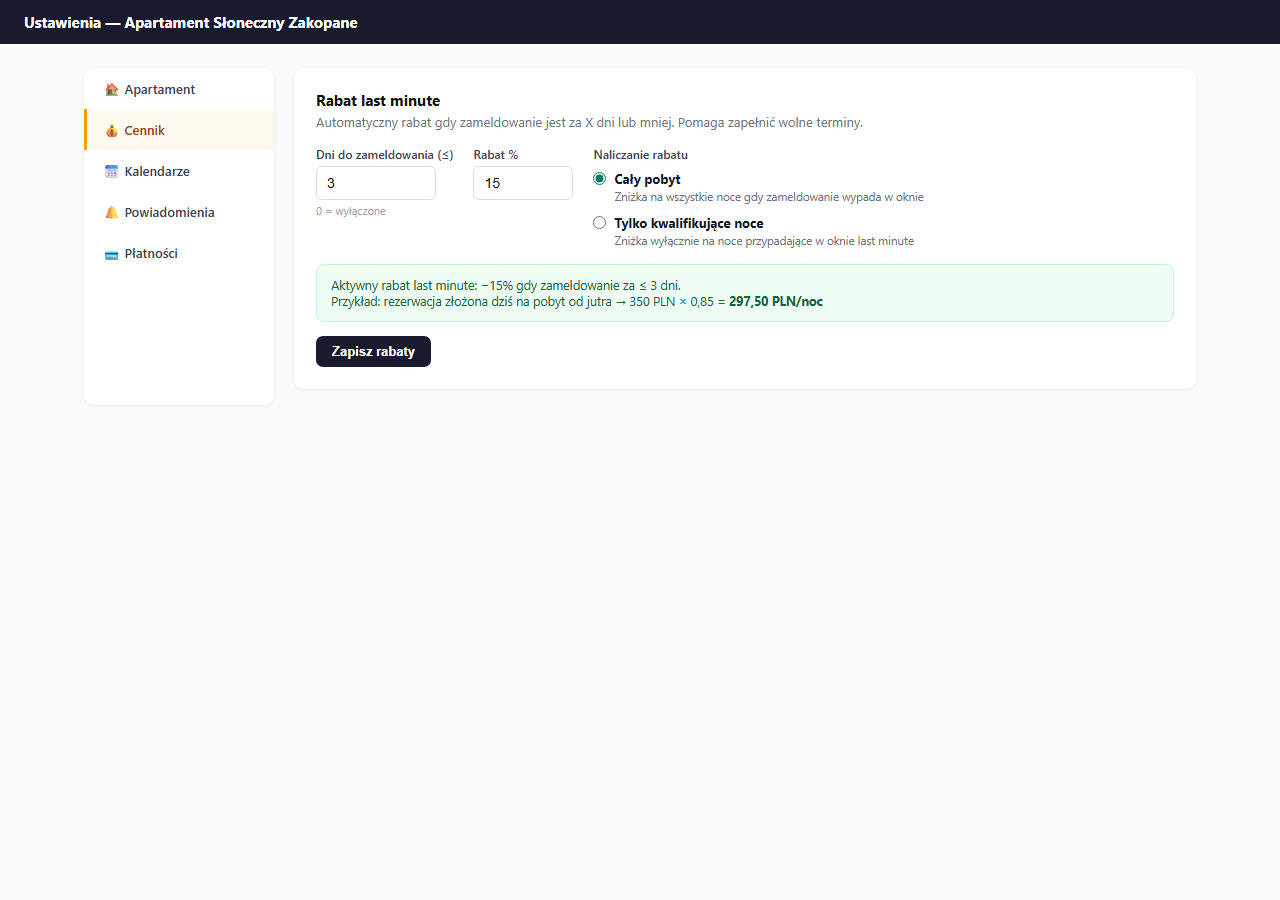
Parameters
Days to check-in (≤) — the number of days from today to the check-in date at which the discount activates. Enter 0 to disable last minute.
Examples:
3→ discount when check-in is 3 days away or less (today, tomorrow, the day after, in 3 days)7→ discount when check-in is a week away or less1→ discount only for bookings for today or tomorrow
Discount % — the percentage discount off the accommodation amount.
Two calculation modes
Whole stay (recommended)
The discount covers all nights of the stay if check-in falls within the last-minute window.
Example: a 3-day window, 15% discount. The guest books today for a stay from tomorrow to 5 days out (4 nights). Check-in is "in 1 day" → all 4 nights are reduced by 15%.
Only qualifying nights
The discount covers only those nights of the stay that fall within the last-minute window.
Example: a 3-day window, the guest books a stay from tomorrow to 7 days out (6 nights). Only the first 3 nights (tomorrow, the day after, in 3 days) get the discount — the other 3 nights at the normal price.
The "only qualifying nights" mode is rarely used — use it if you want very precise control over when the discount is visible.
Configuration examples
Standard last minute (recommended for most):
- Window: 3 days
- Discount: 15%
- Mode: Whole stay
Aggressive — filling weekends:
- Window: 2 days
- Discount: 20%
- Mode: Whole stay
Mild last minute:
- Window: 7 days
- Discount: 8%
- Mode: Whole stay
How the discount is calculated
For a base price of 350 PLN and a 15% last-minute discount:
| Stay | Price without discount | Discount −15% | Discounted price |
|---|---|---|---|
| 2 nights | 700 PLN | −105 PLN | 595 PLN |
| 4 nights | 1,400 PLN | −210 PLN | 1,190 PLN |
| 7 nights | 2,450 PLN | −367.50 PLN | 2,082.50 PLN |
Stacking with other discounts
The last-minute discount stacks with the long-stay discount — the guest can get both if they book last minute for a long stay.
Discounts apply sequentially, they are not added up directly: the last-minute discount is calculated on the accommodation amount already reduced by the long-stay discount.
Example for a 5,000 PLN stay, 14 nights (−10% long stay) and check-in in 2 days (−15% last minute):
- −10% long stay: 5,000 → 4,500 PLN
- −15% last minute on 4,500 → 3,825 PLN
The combined discount is 23.5%, not 25% — precisely because the discounts stack one after another.
How the guest sees it
When selecting dates within the last-minute window, the price on the guest page is automatically reduced by the discount. The summary shows a "Last-minute discount: −X%" line with the amount saved.
Enabling/disabling
Enter 0 in the Days to check-in field and click "Save discounts" — last minute is disabled. Enter any number greater than 0 to enable it.
Related articles: Long-stay discount · Seasonal prices · Promo codes · Price suggestions based on occupancy