The availability calendar is a monthly view that shows bookings, blocks, occupied dates from OTAs (Booking.com, Airbnb) and prices for each day in one place. Available from the panel's side menu under Calendar.
Calendar view
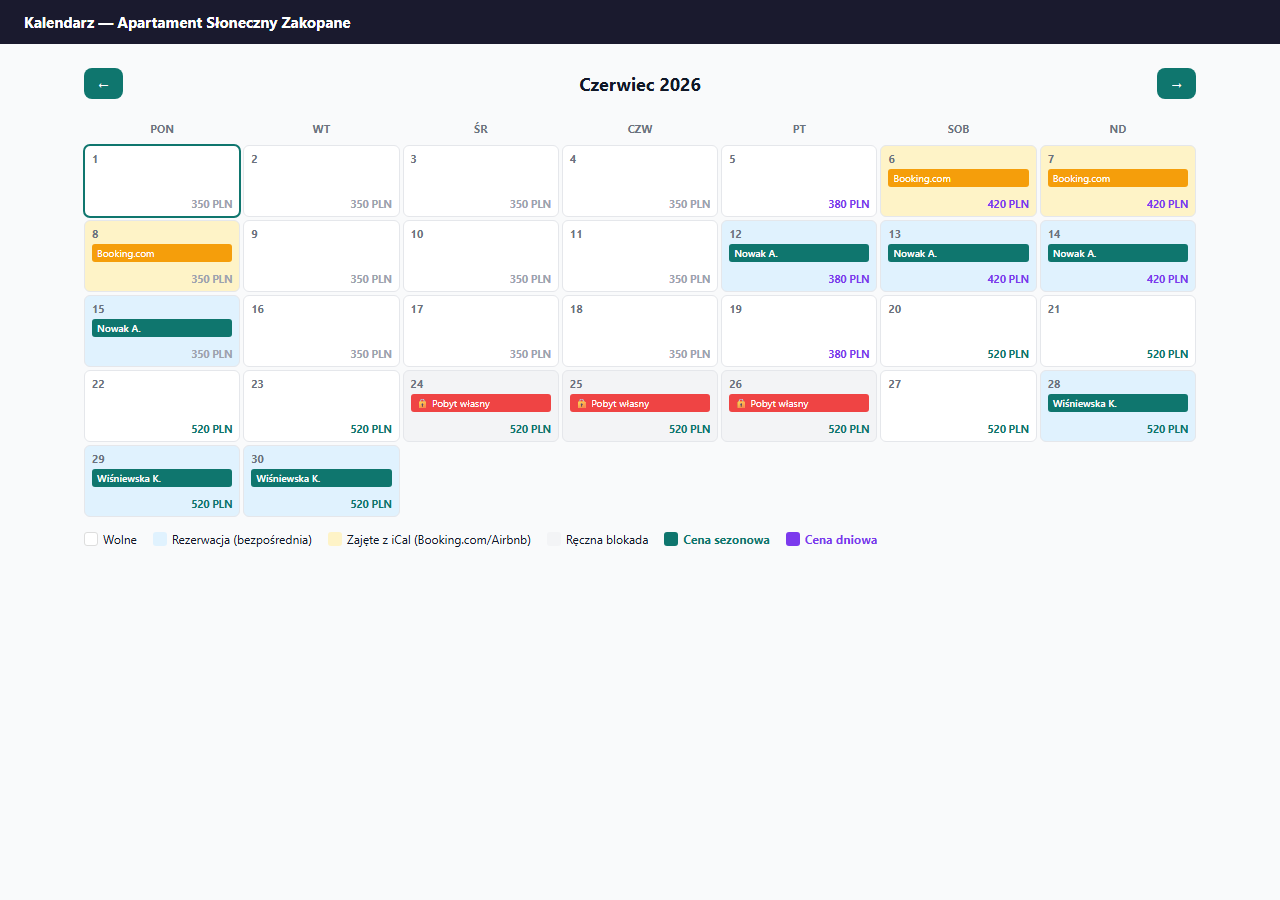
What the colors mean
| Color | Meaning |
|---|---|
| White | Free day — a guest can book it |
| Blue | Direct booking (through your erphome.pl page) |
| Yellow | Occupied via iCal — blocked by Booking.com or Airbnb |
| Gray | Manual block — added by you in the panel |
| Red | Conflict: block + booking (needs attention) |
| Striped | Date outside the lead-time window (too early or too late to book) |
Prices in tiles
In the bottom-right corner of each day, the price per night is shown, with colors indicating the type:
- Gray — base price (default)
- Purple — day-of-week price (e.g. a higher weekend)
- Green — seasonal price (e.g. higher in summer)
- Orange, struck through — last-minute discounted price
The struck-through last-minute price in a tile is a per-night preview — it roughly shows the rate within the last-minute window. The actual discount depends on the check-in date, and in "whole stay" mode it covers every night of the stay. The final amount is calculated by the booking page. Details: Last-minute discount.
Navigation
The ← and → arrows in the top bar move to the previous or next month. You can browse arbitrarily far into the future — handy for planning blocks for a vacation or New Year's Eve.
What the guest sees vs. what the owner sees
The calendar in the panel is the owner's view — full, with guest names and block notes. The guest sees a simplified calendar on the booking page: only free/occupied days, with no booking details.
How the calendar updates
- Direct bookings — appear immediately after a request is submitted.
- Manual blocks — immediately after being added in the Blocks section.
- iCal from Booking.com / Airbnb — updated every hour by cron. You can also sync manually in Settings → Calendars.
If a guest sees a day as free while you see it as occupied in the panel — this may be an iCal sync delay (up to 1 hour). Run a manual sync in Settings → Calendars → Sync now.
Viewing occupancy outside the panel
You don't have to open the panel to check dates. Bookings can flow into your Google Calendar as events (with guest details), and you can subscribe to the iCal export link in any calendar app — Apple, Outlook. You then get the same occupancy view on your phone, without logging into erphome.pl.
Related articles: Manually blocking dates · Gap between bookings · Last-minute discount · How iCal synchronization works · Sync frequency