Airbnb supports iCal through the Calendars → Import/Export section. The setup is similar to Booking.com — two directions: importing occupied dates from Airbnb and exporting your direct bookings to Airbnb.
Step 1 — Import: copy the iCal link from Airbnb
Sign in at airbnb.com and go to managing your listing:
Your listings → [select a listing] → Calendar → Export calendar
Airbnb will show a link in the format:
https://www.airbnb.com/calendar/ical/YOUR_ID.ics?s=YOUR_TOKENClick "Export calendar" and copy the displayed link.
The path on Airbnb may change with interface updates. Look for the Calendar tab or the Sync / Import / Export iCal option.
Step 2 — Paste the iCal link into erphome.pl
Go to: Settings → Calendars in the erphome.pl panel.
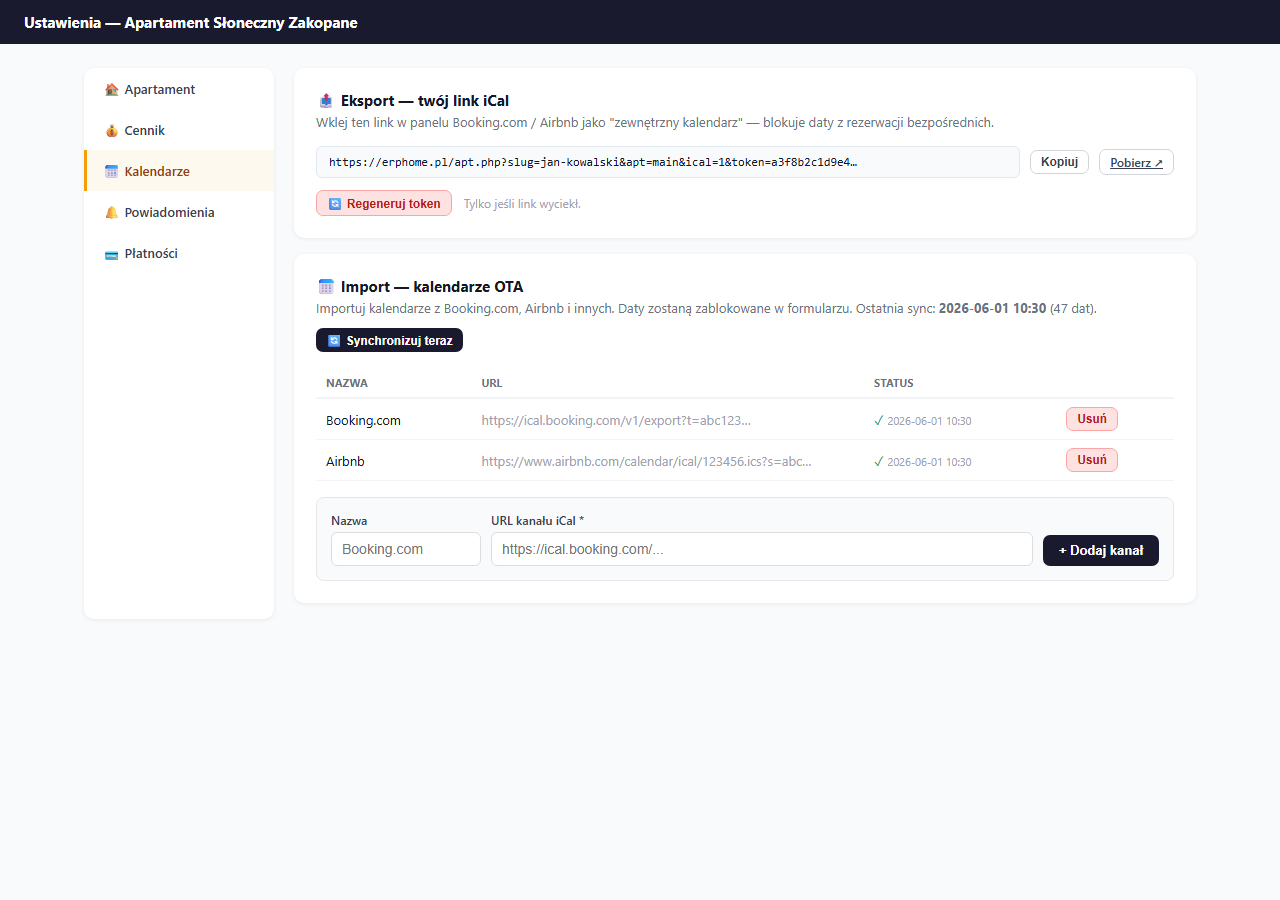
In the "📅 Import — OTA calendars" section:
- In the Name field, type
Airbnb. - In the iCal feed URL field, paste the link copied from Airbnb.
- Click "+ Add feed".
Click "🔄 Sync now" — erphome.pl will immediately fetch the occupied dates.
Step 3 — Export: paste the erphome.pl link into Airbnb
Copy your unique export link from erphome.pl (the "📤 Export — your iCal link" section → "Copy").
Go back to Airbnb and navigate to:
Your listings → [listing] → Calendar → Import calendar
Paste the erphome.pl link, give it a name (e.g. "erphome.pl") and save. Airbnb will update the calendar from your direct bookings every few hours.
Airbnb vs. Booking.com difference
| Airbnb | Booking.com | |
|---|---|---|
| iCal link to export | Calendar → Export | Calendar → Sync |
| iCal link to import | Calendar → Import | Calendar → External import |
| Refresh frequency | Every 1–6 hours | Every 1–6 hours |
| URL format | airbnb.com/calendar/ical/ID.ics | ical.booking.com/v1/export?t=TOKEN |
Verification
- In erphome.pl, click "Sync now" after adding the feed — check that a ✓ and the number of fetched dates appear in the table.
- On Airbnb — days occupied by your direct bookings should show as blocked after the next refresh (up to a few hours).
Common problems
"Connection timeout" during sync — Airbnb occasionally changes the format or availability of iCal links. Generate a new iCal link in the Airbnb panel and update it in erphome.pl (delete the old feed → add a new one with the new link).
Dates from Airbnb aren't blocked — make sure the link is correct and starts with https://www.airbnb.com/calendar/ical/. Check that your Airbnb account is active and the listing is published.
Related articles: How iCal synchronization works · iCal from Booking.com · iCal export — link for Airbnb · Sync frequency · How the availability calendar works