Additional fees are amounts added to the accommodation price — e.g. final cleaning, parking, allowing a pet. You can choose whether they're mandatory (always charged) or optional (the guest selects them when booking).
Where to set it
Settings → Pricing → the "Additional fees" card.
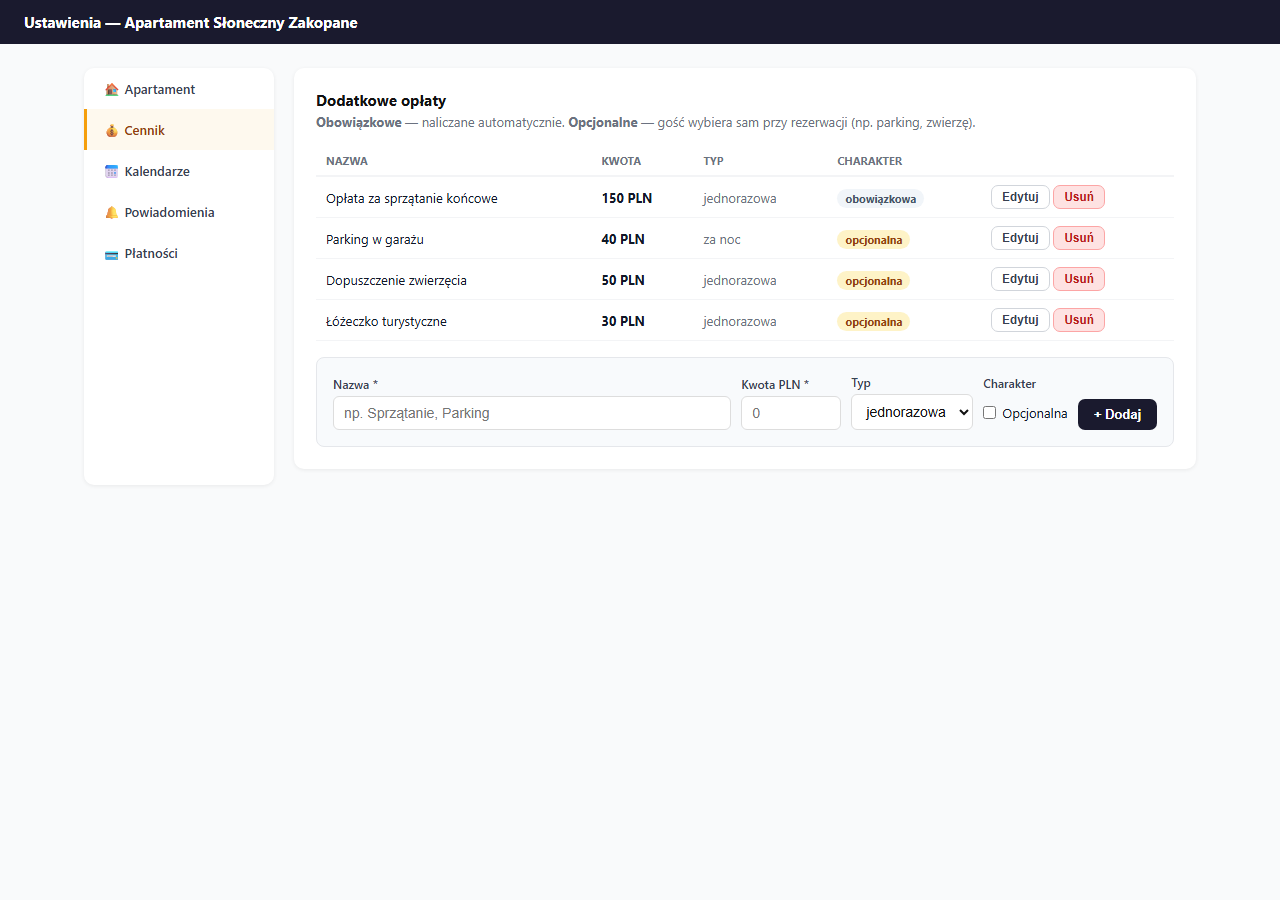
Two charging types
One-time — added once to the whole stay, regardless of the number of nights. Example: a 150 PLN cleaning fee whether the guest stays 2 or 14 nights.
Per night — added to each night of the stay. Example: parking 40 PLN/night — for 7 nights the guest pays an extra 280 PLN.
Mandatory vs. optional
Mandatory — automatically added to every booking; the guest can't remove it. Use it for fees you always charge (e.g. final cleaning, a service fee). Don't add the deposit here — it's a separate mechanism (see the section below).
Optional — appears as a checkbox next to the booking form with a description and amount. The guest ticks what they want, e.g. parking or a travel cot.
Configuration examples
| Name | Amount | Type | Nature |
|---|---|---|---|
| Final cleaning fee | 150 PLN | one-time | mandatory |
| Garage parking | 40 PLN | per night | optional |
| Pet allowance | 50 PLN | one-time | optional |
| Travel cot | 30 PLN | one-time | optional |
| Premium towels | 20 PLN | one-time | optional |
How the guest sees it
On the booking page, after selecting dates, the price summary shows the breakdown:
- Accommodation price: 350 PLN × 7 nights = 2,450 PLN
- Cleaning fee: 150 PLN (mandatory)
- Parking: 280 PLN (optional — if ticked)
- Total: 2,880 PLN
The guest sees all fees before submitting the booking — no surprises at check-out.
Adding a fee
- Enter the Name — it will be visible to the guest when booking.
- Enter the Amount PLN.
- Choose the Type: one-time or per night.
- Tick Optional if the guest should have a choice; leave it unchecked for mandatory ones.
- Click "+ Add".
Editing a fee
Click "Edit" next to the chosen fee — the edit form appears in place of the row. Change the values and click "Save".
Removing
Click "Delete" and confirm. The removal is immediate — the fee disappears from future bookings (existing ones are not modified).
A deposit is not an additional fee
A deposit (refundable) works separately from additional fees — it doesn't appear in the price calculation, but is tracked independently in the panel with its own status cycle (pending → paid → returned). You set it in Settings → Pricing → Deposit. Details: Deposit (refundable).
Related articles: Extra-guest surcharge · Promo codes · Long-stay discount · Deposit (refundable)