iCal synchronization in erphome.pl runs automatically every hour. You can also trigger it manually at any time — e.g. right after confirming a direct booking, to block the dates in OTAs as quickly as possible.
Sync status
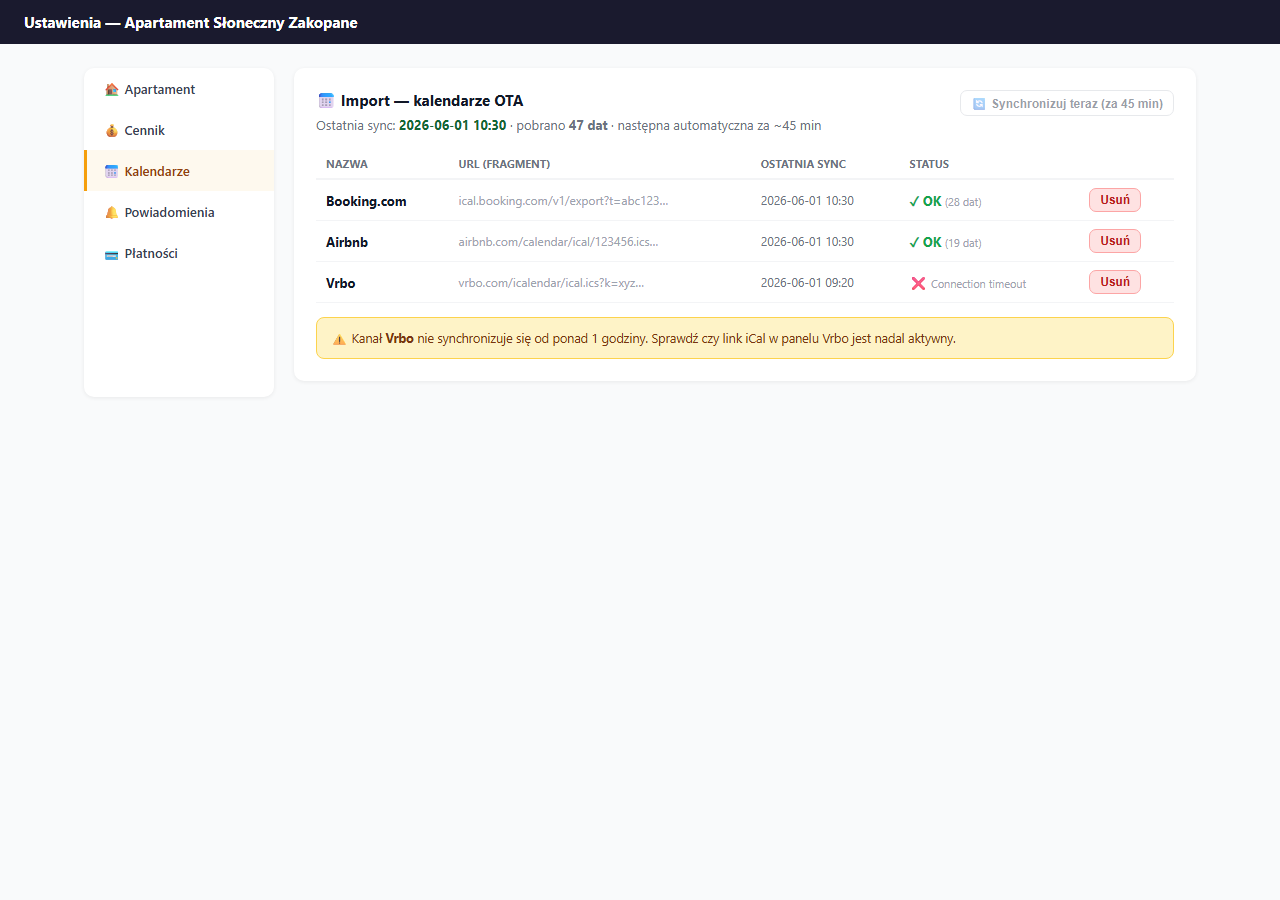
The import section in Settings → Calendars shows:
- The date and time of the last sync
- The number of fetched dates (occupied days from OTAs)
- The status of each feed — ✓ OK or ❌ error
Automatic sync (hourly)
A cron job runs every hour and fetches all added iCal feeds for all active apartments. It works without your involvement — as long as the feeds are correctly added and accessible.
Limit: erphome.pl doesn't allow a manual sync more often than once per hour — the "Sync now" button is disabled if less than 60 minutes have passed since the last sync.
Manual sync
Click "🔄 Sync now" in the import section. The sync runs on all feeds at once and takes a few seconds.
When to sync manually:
- Right after confirming a direct booking — to update the OTA as quickly as possible.
- When you've just returned from vacation and want to check the current calendar state.
- After adding a new iCal feed — the first automatic sync may take a few minutes.
- When you suspect a discrepancy between your calendar and an OTA.
What to do when a feed reports an error
In the feeds table, a shortened error message appears next to the ❌ status. Common causes:
| Error | Cause | Solution |
|---|---|---|
Connection timeout | OTA server unavailable | Wait and try again; check that the link is active |
Invalid URL | Incorrect URL format | Delete the feed, copy a fresh link from the OTA and add it again |
403 Forbidden | Link expired or token changed | Generate a new iCal link in the OTA panel and update it |
Not a valid iCal file | The URL doesn't return an iCal file | Check that the link leads to a .ics, not an HTML page |
If the error persists across several syncs — delete the feed and add it again with a new link.
Delays and the risk of double bookings
| Stage | Time |
|---|---|
| Import: erphome.pl ← OTA | Up to 1 hour (cron) |
| Export: OTA ← erphome.pl | Up to 6 hours (depends on the OTA) |
| Double-booking risk | Within this time window |
In the delay window there's a theoretical risk that the same date gets booked in two places at once. To minimize it:
- After each direct booking — sync manually in erphome.pl.
- On Booking.com and Airbnb you can also manually refresh the external calendar.
- Consider setting a minimum booking lead time (e.g. 1–2 days) — it gives time for syncing.
How many iCal feeds can I add
There's no limit on the number of feeds. You can have Booking.com, Airbnb, Vrbo, Tripadvisor and others at the same time. Each feed syncs independently.
A single iCal URL can be connected to only one apartment in erphome.pl. If you try to add the same URL to a second apartment, the system shows an error.
Related articles: How iCal synchronization works · iCal from Booking.com · iCal from Airbnb · iCal export · Minimum booking lead time · Google Calendar — automatic booking events